

Can You Trust an AI to Run IT? Inside Agentic IT's Guardrails
The honest answer for CISOs: what stops an autonomous IT engineer from doing something dangerous — scoped permissions, human approval, full audit trail.
Every IT director and CISO who watches an autonomous IT engineer resolve a real ticket has the same next thought: what happens the day it does something dumb? It's the right question. An agent that can reset passwords, change group membership, and reconfigure Exchange is, by definition, an agent that can break things at machine speed. This post is the honest answer — not "trust us," but a walk through the specific guardrails that decide whether you can trust an autonomous IT engineer with production access, and how to verify each one before you turn it on.
The short version: safe autonomy isn't a property of the model. It's a property of the architecture around the model — scoped permissions, a code-level policy engine, human approval where it matters, and a complete audit trail. Here's how Dex handles each, and where it deliberately hands the work back to a human.
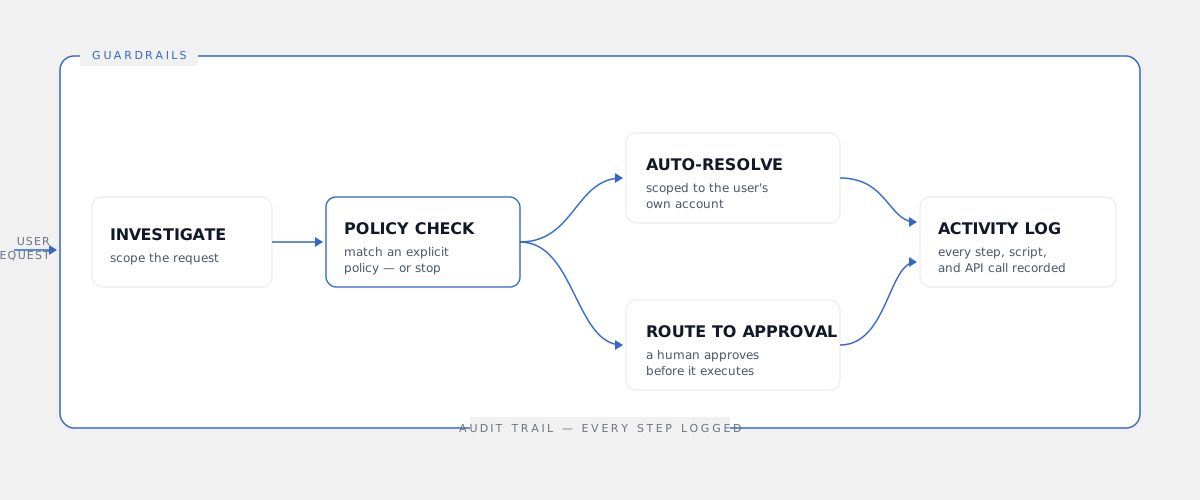
The first guardrail is what the agent is even allowed to touch
Most of the risk in autonomous IT is decided before the agent does anything — by the credential it acts through. This is the question to ask any vendor first: whose permissions is your agent using?
Dex's two products answer this differently, on purpose, because they have different jobs.
Dex Go is the employee-facing engineer that lives in Microsoft Teams. Its security boundary is the simplest possible one: it can only act on the requesting user's own account. A user asking Dex Go to reset their password or recover their MFA can only ever affect themselves. There is no path for an end user to ask Dex Go to touch someone else's account — the scope is the requester, full stop. The blast radius of an employee self-service request is exactly one account: their own.
Dex Pro is the admin-facing engineer, and it operates through delegated OAuth — the admin's own token, not a shared application API key. That distinction is the whole ballgame for a CISO. A shared API key is a master credential with broad access; if it leaks, everything it can reach is exposed, and every action it takes looks identical and anonymous in your logs. Delegated OAuth means Dex Pro acts as the specific admin who authorized it, bounded by that admin's existing permission scope in Entra ID. It never grants itself admin roles and never bypasses MFA. You can revoke the consent at any time, and every action is attributed to a real identity. The agent can't do anything the human behind it couldn't already do.
No policy, no action — and it's enforced in code
Scoped permissions decide what's reachable. The policy engine decides what's allowed — and this is where agentic IT separates from the chatbots.
Every action Dex takes must match an explicit, structured policy. No matching policy means no action. This is enforced at the execution layer in code, not as an instruction in a prompt. The difference matters more than it sounds: prompt-based "guardrails" are suggestions a model can be argued out of, and prompt injection is a real attack surface for any AI system with tool access. A code-level gate is not. A cleverly crafted request can't talk Dex into an action that no policy permits, because the check happens after the model decides and before anything executes.
You author these policies in Users & Policies, the admin console where you define what Dex can do, for whom, and under what conditions. The model is layered — global rules, tenant rules, target rules, department, action, and runtime — so you can say "Dex may reset passwords for the Sales department, but license changes always require approval" and have that hold deterministically. Your policy is the contract. Dex operates inside it or escalates. For the bigger picture of how investigate-plan-execute works under governance, see our definition of agentic IT.
A human stays in the loop where the stakes are real
Autonomy and oversight aren't opposites. The point of agentic IT is to remove the human from the routine, not from the consequential — and Dex draws that line explicitly.
On the admin side, Dex Pro shows every planned action before it executes. You see what it's about to do — the exact change, against the exact target — and you approve it. For repetitive bulk work, once you've watched the pattern and trust it, you flip on Approve Always so a 300-account license migration doesn't ask you 300 times. That's a choice you make per pattern, not a default you inherit.
On the employee side, Dex Go resolves routine, policy-bounded requests scoped to the user's own account without a human in the path — because that's the entire value of self-service, and the blast radius is one account acting within a policy you wrote. But the autonomy has a hard edge. When a request falls outside policy, or genuinely needs architectural or security judgment, Dex escalates to a human. It doesn't guess, and it doesn't quietly do nothing. It hands the case to your team with full context attached — what the user asked, what it investigated, what it would have done, and why it stopped. The escalation is a feature, not a failure. An agent that never escalates is an agent that's pretending to be more certain than it is.
Every step is recorded — twice
A guardrail you can't audit isn't a guardrail; it's a hope. Trust in autonomous IT comes from being able to answer "what exactly did it do, and on whose authority?" — for any action, after the fact.
Dex records every step, script, and API call in its own Activity Log. Not "a ticket was resolved" — the actual reasoning steps, the actual calls made against your tenant, the policy that authorized each one. Because Dex can run up to 40 reasoning steps on a single task, that granularity matters: you can see not just the outcome but the path it took to get there.
And because Dex Pro acts through delegated OAuth rather than an anonymous service account, those same actions also appear in your native Microsoft 365 logs — Entra ID audit and sign-in logs, Exchange message tracking, Intune device actions — attributed to a real identity. Your existing SIEM, your Conditional Access policies, your compliance tooling all see Dex's work the way they'd see any admin's. You don't have to take Dex's word for what happened; Microsoft's logs corroborate it. Two independent trails, one of them outside Dex's control. For the full security posture — certifications, data handling, architecture — see the Dex security overview.
You can watch it work before you trust it
No responsible IT leader turns on autonomous production access on day one, and Dex isn't designed to ask you to.
The Playground lets you exercise requests and watch how Dex investigates, plans, and what it would execute — before any of it touches your live tenant. You can confirm it behaves the way your policies intend and find the edges where you want a human in the loop. It turns "trust the agent" into "verify the agent," which is the only version of trust a CISO should accept.
That feeds a rollout pattern we recommend — the opposite of a flip-the-switch deployment:
- Author narrow policies first in Users & Policies. Start with a small surface — say, password resets and MFA recovery — not the whole tenant.
- Watch Dex work in the Playground against that surface until its behavior is boring and predictable.
- Require approval on every action for the first live runs, so a human sees each change before it lands.
- Widen autonomy only on the patterns you've verified, switching on Approve Always where the risk is understood and the volume justifies it.
Trust is granted incrementally, on evidence. The product is built to let you do exactly that.
Where the Security Center ties it together
The individual guardrails are only as good as your ability to see them in one place. The Security Center is where the posture lives - who has access, what Dex is permitted to do, what it has done, and where the policy boundaries sit. Combined with the compliance footprint of SysAid's platform, which Dex is built on - ISO 27001 / 27017 / 27018 and SOC 2 Type 2 certified (Dex's own certifications are in process), plus GDPR and HIPAA-aligned controls - and a zero-data-retention design where Dex reads only what a task needs and discards it, the security story is built to survive a real CISO review, not a demo.
A note on honesty, because this post's whole job is trust: Dex isn't claiming to be infallible. It's claiming to be governed — scoped so it can't reach what it shouldn't, gated so it can't do what no policy allows, supervised where the stakes are high, and recorded so nothing it does is invisible. The cases that genuinely need a human still go to a human. That's not a limitation we're hiding; it's the design. You can read more about how the admin-side console enforces this on the Dex Pro product page.
So — can you trust it?
The right answer isn't "yes" or "no." It's that trust is something you grant in steps, against evidence. An autonomous IT engineer earns production access the same way a new senior hire does: scoped permissions, clear policies, supervised early work, and a record you can audit. With Dex, all four are properties of the system rather than promises about a person.
"Governed autonomy" is the phrase we use internally, and it's the honest one. The agent is powerful enough to resolve L1 through L3 work end-to-end — routine resets through deeper troubleshooting and configuration — and constrained enough that a CISO can sign off on it. If a vendor offers you the first half without the second, that's the thing to walk away from. The whole point of the guardrails is that you shouldn't have to choose.
If you want to pressure-test this against your own environment — your Entra ID setup, your Conditional Access policies, your audit requirements — book a demo and we'll walk the Security Center and the Activity Log live, with your questions, not ours.
Frequently asked
- What stops an autonomous IT agent from doing something dangerous?
- Three layers, and none of them are 'we asked it nicely.' First, scoped permissions: Dex Go can only act on the requesting user's own account, and Dex Pro acts through the admin's own delegated OAuth token — never a shared master key with broad access. Second, a code-level policy engine where every action must match an explicit policy or it doesn't run. Third, human-in-the-loop approval on admin-side changes, where every action is shown before it executes. The safety lives in the execution layer, not in a prompt the model could be talked out of.
- Does a human still approve what the AI does?
- For admin-side work, yes. Dex Pro shows every planned action before it runs, and the admin approves it — with an 'Approve Always' option for bulk operations once you trust a given pattern. For employee self-service through Dex Go, routine requests scoped to the user's own account (a password reset, their own group access request under policy) can resolve autonomously, because the blast radius is one account and the action matched a policy you defined. Anything outside policy, or needing architectural judgment, escalates to a human with full context attached.
- Is every action the AI takes auditable?
- Yes. Dex records every step, script, and API call in its own Activity Log, and those actions also land in the native Microsoft 365 logs (Entra ID sign-in and audit logs, Exchange, Intune). Because Dex Pro acts through the admin's delegated OAuth token, M365 attributes the change to a real identity — not an anonymous service principal — so your existing SIEM and Conditional Access policies see it the way they'd see any admin action. You get two trails: Dex's own and Microsoft's.
- Can I test what the AI will do before it touches production?
- Yes — that's what the Playground is for. You can exercise requests and see how Dex investigates, plans, and what it would execute, before you let it run against your live tenant. Combined with the Policy Engine, the recommended rollout is: define narrow policies, watch Dex work in the Playground, start with approval required on every action, then widen autonomy on the patterns you've verified. Trust is something you grant incrementally, not on day one.
- How is delegated OAuth safer than a shared API key?
- A shared application API key is a single broad-access credential that acts as itself — if it leaks, it's a master key, and every action looks identical in the logs. Delegated OAuth means Dex Pro acts as the specific admin who authorized it, inside that admin's existing permission scope. It never grants itself admin roles and never bypasses MFA. The blast radius is bounded by what that admin could already do, every action is attributed to a real person in Entra ID, and you can revoke the consent at any time.