

Copilot suggests. Dex acts. The line M365 buyers keep getting wrong.
Agentic IT vs Copilot: why a copilot that drafts answers and an autonomous IT engineer that closes the work are different purchases for M365 IT teams.
Every IT leader running Microsoft 365 already has Copilot in the tenant. So when an autonomous IT engineer shows up in the evaluation, the first question in the room is almost always the same: isn't this just Copilot? It is a fair question, and it deserves a precise answer, because the two products look alike for about thirty seconds and then diverge completely.
The short version of agentic IT vs Copilot: Copilot suggests, and a person acts. Dex acts, and a person supervises. This post draws that line as a capability ladder, so you can place any tool on it in one conversation and stop budgeting for one category while expecting results from the other.
Why "isn't this just Copilot?" comes up first
Copilot earned its place. It lives inside Outlook, Teams, Word, and the admin experiences your team already uses, and it is good at what it was built for: helping a person write, read, and summarize faster. Because it is already licensed and already familiar, it becomes the reference point for every other AI product in the stack.
That creates a predictable mistake. Buyers see a chat interface, see natural language going in and a useful answer coming out, and file everything with a chat box under "Copilot-like." Two very different purchases end up in the same budget line. One makes your people faster at the work. The other takes the work off their plate. Mixing them up leads to two bad outcomes: either you skip the tool that would actually shrink the queue, or you buy an assistant expecting it to shrink the queue and wonder six months later why ticket volume never moved.
Agentic IT vs Copilot: the capability ladder
In June we published three questions that separate agentic IT from chatbot copilots, a field test for vendor demos: does it investigate, does it execute, and is every action bound to policy. This post takes a different cut. Instead of a checklist, think of IT work as a ladder with five rungs. The question is not whether a tool is "agentic." It is which rung it stops on.
- Suggest and draft. Read the request and produce something useful: a suggested fix, a drafted reply, a summary, a link to the right setting.
- Investigate. Look at the actual environment. Check the user's sign-in logs, license state, group memberships, device compliance, and mailbox rules to find the real cause, not just the stated symptom.
- Plan. Decide what to do, in what order, with what dependencies, and whether each step is allowed.
- Execute. Make the change in the real system: Entra ID, Exchange Online, Intune, SharePoint, Teams.
- Close. Confirm the fix worked, tell the user, and leave an audit trail entry that records who asked, what changed, and why it was permitted.
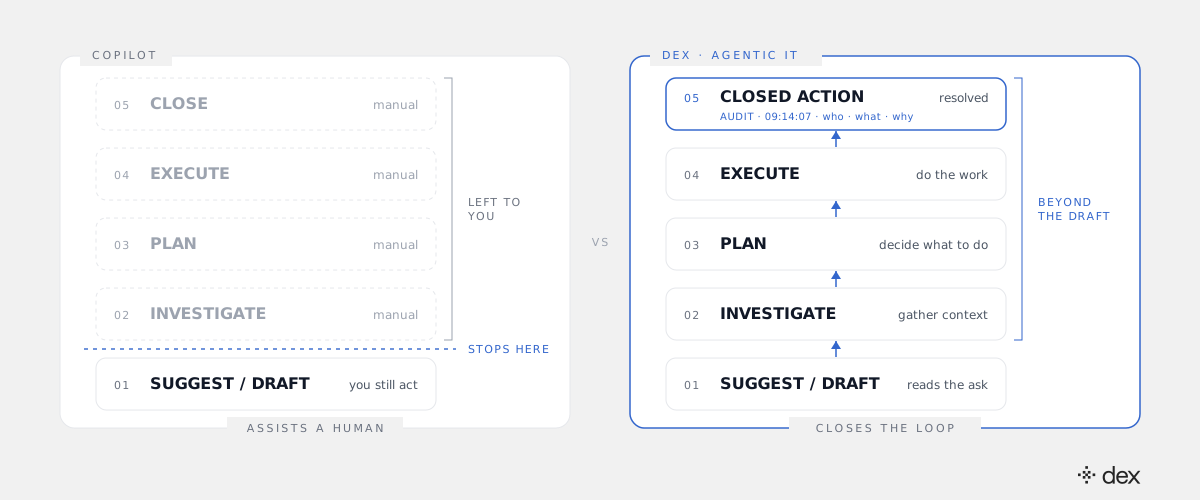
Copilot is designed to live on rung one. It does that rung well, and it hands everything above it back to a person. Rungs two through five are manual: a technician still investigates, still decides, still clicks through the admin center, still closes the ticket. Dex is built to climb the whole ladder. The rung where a tool stops is the rung where your team's labor starts again.
What "suggests" costs you in practice
Take a common request. A user in finance says they cannot open a shared workbook on SharePoint that they could open yesterday.
With a copilot, the flow looks like this. The user asks, and the copilot drafts a helpful answer about SharePoint permissions. The user still cannot open the file, so they file a ticket. A technician picks it up, maybe with Copilot summarizing the thread. The technician checks the site permissions, finds the user was removed from a group during a department reorg, confirms with the manager that access is still appropriate, re-adds the user, and replies. Copilot made two of those steps a little faster. A human still did all of them.
With Dex, the user asks in Teams. Dex investigates: it checks the file's permissions, sees the group change, traces it to the reorg, and confirms the user's current role still qualifies under policy. It plans the fix, checks that a policy permits restoring that membership, executes it, confirms the user can open the file, and logs the action. No ticket is opened. No technician is interrupted. The request is closed, not drafted.
That is the whole difference in one request. Multiply it by every access, license, mailbox, device, and configuration request your team handles in a month and you get the gap between a faster help desk and a smaller queue.
It is not only the easy tickets
A common follow-up is that autonomy sounds fine for password resets but the real work lives higher up. That is true of the work, and it is exactly why the ladder matters.
Dex resolves L1 through L3. Tier 1 is the routine surface: password resets, MFA recovery, group and license access, provisioning. Tier 2 and Tier 3 are where the investigation rung earns its keep: a mail flow issue caused by a transport rule, a device falling out of compliance because of an Intune policy conflict, a Conditional Access policy blocking a group it should not, a Teams provisioning failure that depends on three settings in three admin centers. These are multi-step problems that used to sit in a senior engineer's queue because they required someone to look, reason, and act across systems. A tool that stops at rung one cannot touch them. A tool that climbs the whole ladder can.
What does not resolve autonomously is genuine architecture and business judgment. Those cases escalate to a human with the full investigation attached, so your engineer starts at the decision instead of the diagnosis.
Acting safely is the hard part
Climbing past rung one is where the risk lives, which is why the top of the ladder needs different machinery than the bottom. A suggestion that is wrong wastes a minute. An action that is wrong changes your tenant.
Dex handles this in the execution layer, not the prompt. Every action must match an explicit, structured policy across a six-layer model, from global and tenant rules down to department, action, and runtime checks. No matching policy means no action, enforced in code where a clever prompt or an ambiguous request cannot reach it. Dex acts through delegated permissions instead of a broad shared API key, and every change is recorded in both the Microsoft 365 logs and Dex's own Activity Log. That audit trail entry on rung five is not decoration. It is how you prove the work was done, by whom, and under which rule. For the full walk through investigation, planning, policy checks, and execution, see how Dex works.
How Copilot and Dex fit in the same tenant
This is not a replace-Copilot argument. Keep it. Copilot will keep helping your people draft email, summarize meetings, and find answers faster, and your IT team will use it too.
The mistake is asking Copilot to do a job it was not designed for, or assuming an autonomous engineer is a duplicate of something you already own. They sit at different rungs. Copilot makes a person faster at rung one. Dex does rungs one through five so the person is not needed for that request at all. In a well-run M365 environment, you want both: an assistant for knowledge work and an engineer for IT work.
What to do with this
The next time "isn't this just Copilot?" comes up, in a buying committee, a budget review, or your own head, skip the label and ask one question: which rung does this tool stop on?
If it stops at suggest and draft, it is an assistant, and the value is individual speed. If it climbs through investigate, plan, and execute to a closed action with an audit trail, it is an autonomous engineer, and the value is work your team no longer has to do. Price them differently, measure them differently, and expect different results.
Copilot suggests. Dex acts. Once you see the ladder, you stop mixing them up.
Frequently asked
- What is the difference between agentic IT and Microsoft Copilot?
- Copilot is an assistant. It drafts, summarizes, and suggests inside Microsoft 365, and a person reviews the output and does the work. Agentic IT is an autonomous engineer. It investigates the environment, plans a sequence of actions, executes them against the real tenant under explicit policy, and closes the request with an audit trail entry. The test is simple: when the tool finishes, has the change happened, or does someone on your team still have to make it?
- If we already pay for Copilot, do we still need an autonomous IT engineer?
- They solve different problems, so one does not replace the other. Copilot makes individual people faster at writing, reading, and summarizing. An autonomous IT engineer like Dex removes IT work from the queue entirely by resolving requests end to end. Copilot helps your technicians type the answer. Dex means the ticket never needs a technician in the first place, and the two run side by side in the same Microsoft 365 tenant.
- Can Copilot resolve IT tickets on its own?
- Copilot is designed to keep a human in the loop who performs the action. It can help an admin find a setting, draft a user reply, or summarize a ticket thread. It is not built to diagnose a problem across Entra ID, Exchange Online, Intune, and SharePoint, carry out the fix under a delegated-permission policy, and close the request without a person picking it up. That end-to-end loop is what defines agentic IT.
- Does Dex only handle simple L1 requests like password resets?
- No. Dex autonomously resolves L1 through L3. That covers routine Tier 1 work like password resets, MFA recovery, and access provisioning, and also deeper Tier 2 and Tier 3 troubleshooting, configuration changes, and engineering-adjacent tasks that used to need a senior technician. Only genuine architectural or business-judgment cases escalate to a human, and they arrive with the full investigation attached.
- How is it safe to let an AI execute changes in a production M365 tenant?
- Safety has to live below the model, not inside the prompt. Dex checks every action against an explicit, code-level policy before it runs: no matching policy means no action, and prompt injection cannot talk its way past a rule enforced in the execution layer. Dex acts through delegated permissions rather than a broad shared API key, and every action is recorded in both the Microsoft 365 logs and the Dex Activity Log.