

Dex vs Copilot: the M365 IT buyer's decision table (and when neither is the answer)
Dex vs Copilot for Microsoft 365, task by task: what Copilot suggests, what Dex executes, and the honest cases where neither belongs in your stack.
Every Microsoft 365 buyer evaluating IT automation ends up typing some version of "Dex vs Copilot" into a search bar or a chat window. The honest answer is not a winner. It is a table: for each IT task, who touches the tenant when the work is done. Copilot covers some rows, Dex covers more, a human keeps a few, and some rows are not a software problem at all.
This post is that table. Twelve real Microsoft 365 IT tasks, row by row, with the handoff line marked. We already made the category argument in three questions that separate agentic IT from chatbot copilots. This one is for the buyer who accepts the categories and wants to know which tool owns which line of their queue, and where to spend nothing.
The one question the table answers
The question in every row is the same: after the tool finishes, does the change exist in your tenant, or does someone on your team still have to make it?
That question cuts through feature lists. Microsoft 365 Copilot is very good at language work inside the Microsoft 365 surface: drafting, summarizing, explaining, and answering questions about your environment. Dex is the world's first autonomous IT engineer. It investigates the request, plans the sequence of actions, and executes them across Entra ID, Exchange Online, SharePoint, Teams, and Intune (plus Google Workspace, Okta, and any SaaS with an API) under an explicit policy. Those are different jobs, which is why a single "better tool" answer is the wrong frame.
The decision table: twelve M365 IT tasks, row by row
Here is the full table. "Owner" is our honest call on who should own the row, including the rows where Dex is not the answer.
| IT task | What Copilot does | What Dex does | Who should own it |
|---|---|---|---|
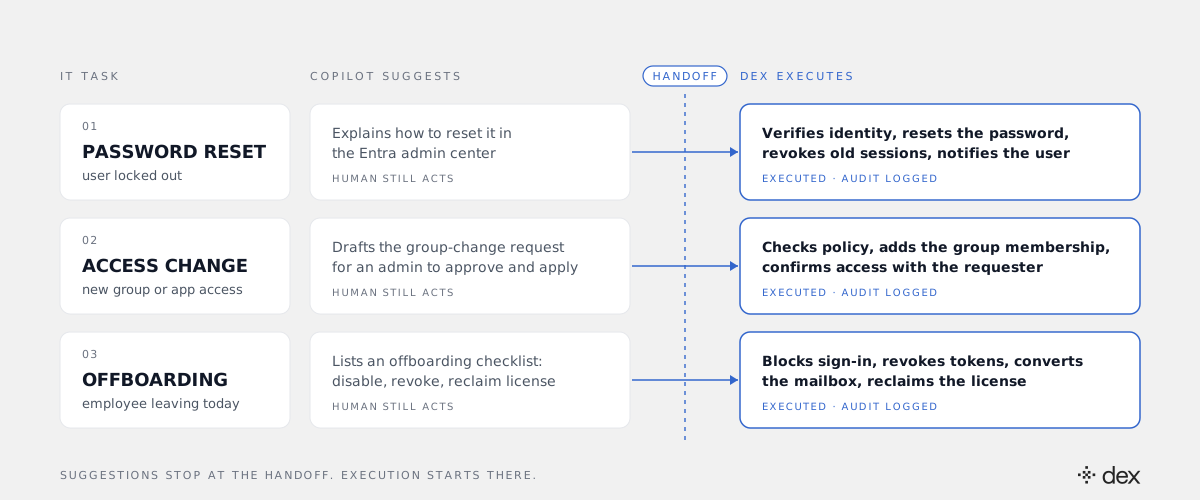
| Password reset, locked account | Explains the steps in the Entra admin center | Verifies identity, resets the password, revokes old sessions, notifies the user | Dex |
| MFA method lost (new phone) | Walks an admin through the portal | Resets the method under policy so the user re-registers. Never bypasses MFA | Dex |
| SharePoint or Teams access | Drafts the request for an admin to apply | Checks policy, adds the group membership, confirms access with the requester | Dex |
| License assignment or reclaim | Answers questions about license usage | Assigns or reclaims the license against your licensing policy | Dex |
| New-hire onboarding | Generates an onboarding checklist | Creates the account, groups, license, and mailbox access the role policy defines | Dex |
| Offboarding | Lists the offboarding steps | Blocks sign-in, revokes tokens, converts the mailbox, reclaims the license | Dex |
| Conditional Access sign-in failure | Explains what a policy is meant to do | Reads the sign-in logs, finds the blocking policy, fixes the scoped cause or escalates with evidence | Dex, human signs off on policy edits |
| Intune device out of compliance | Summarizes compliance state | Investigates the failing setting and remediates within policy | Dex |
| Summarize a long incident thread | Strong fit | Not the job | Copilot |
| Draft user comms for a migration | Strong fit | Not the job | Copilot |
| Grant Global Admin or another privileged role | Explains how | Refuses by design | A human, every time |
| Tenant architecture or migration design | Useful for research | Investigates and reports, does not decide | A human |
How to read the rows
The table splits into three zones. Each one carries a different buying decision.
Rows Dex owns end to end
The first eight rows are execution work. The steps are known, the policy can be written down, and the cost is in the doing, not the deciding. These rows are also not all Tier 1. Password resets and access requests are L1. Conditional Access failures and Intune compliance problems are L2 and L3 work that used to need a senior engineer. Dex resolves L1 through L3 and targets 90% autonomous resolution across that surface. When Dex hits a case outside policy, it escalates to a human with the investigation attached, so nobody starts from zero.
Rows Copilot owns
Summarizing a 60-message incident thread or drafting the email that tells 400 people their mailbox moves on Friday is language work. Copilot is built for it, and Dex is not trying to do it. If your pain is "my admins spend hours writing things," Copilot is a reasonable buy.
Rows a human keeps
Privileged role grants stay with humans because Dex never grants admin roles. That is a design boundary, not a gap on the roadmap. Architecture and migration design stay human because they are judgment calls about tradeoffs your business owns. Dex can gather the evidence fast. It should not make the call.
When neither is the answer
This is the section most vendor comparisons skip. There are four situations where buying Dex, Copilot, or both will not fix the problem.
You have no policy to enforce
Dex enforces policy. Every action must match an explicit rule, and no policy means no action. If nobody in your org can say who approves access to the finance SharePoint site, or what happens to a leaver's mailbox, the first project is writing that down. A copilot will not fix it either. It will just draft a nicer version of the ambiguity.
The native feature is still switched off
If self-service password reset is not enabled in Entra ID, turn it on first. It is included in many Microsoft 365 plans and handles the simplest reset cases. Dex earns its place on everything SSPR does not cover: lost MFA, lockouts, approvals, and the access, license, and device work behind them. Do the free step before the paid one.
Your volume is tiny
A 20-person company with one admin and five requests a month does not have a queue problem. It has a part-time job. Neither tool pays back there, and we would rather say that than sell it.
The work is physical or contractual
Cracked screens, printer swaps, ISP outages, and license true-up negotiations with your reseller do not live in the tenant. No software agent resolves them. If that is most of your backlog, you need a field technician or a better vendor contract.
When you want both
For most Microsoft 365 shops above a couple of hundred seats, the answer is both, bought for different reasons. Copilot is a productivity line for knowledge workers. Dex is an IT operations line that removes execution work from your team's queue before it becomes a ticket. They do not compete for the same rows, and they do not need to share the same budget conversation.
The mistake to avoid is buying Copilot and expecting the IT queue to shrink. A suggestion that a human still has to act on is a faster ticket, not a resolved one. Count the rows in the table above where your team is still the one making the change.
How to use the table in your evaluation
Take your last 90 days of IT requests and sort them into the table's rows. Then check three things.
- Count execution rows. If most of your volume lands in the first eight rows, you have an execution problem, and that is what an autonomous IT engineer is for.
- Check your policies. For each execution row, confirm a written policy exists. Where it does not, write it before you deploy anything.
- Test the handoff live. In a trial tenant, ask each tool to complete an offboarding. Then open the Microsoft 365 audit log and see who actually made the change.
Dex Pro is where your admins run the bigger rows: onboarding, offboarding, license cleanup, and bulk changes, with every action shown before it runs and logged after. See how it works on the Dex Pro product page for IT admins.
The table is the point. Put your own queue into it, mark where the change actually lands, and the Dex vs Copilot decision mostly makes itself, including the rows where the right answer is a policy document or a technician.
Frequently asked
- Is Dex a replacement for Microsoft 365 Copilot?
- No. They do different jobs. Microsoft 365 Copilot makes knowledge workers faster at writing, summarizing, and finding information, and it helps admins understand their tenant. Dex is an autonomous IT engineer: it investigates the request, plans the change, and executes it in Entra ID, Exchange Online, SharePoint, Teams, and Intune under explicit policy. Plenty of Microsoft 365 shops will run both.
- Can Copilot execute IT changes in Microsoft 365?
- Out of the box, Copilot in the Microsoft 365 experience assists an admin who stays in the loop and performs the change. You can build custom agents in Copilot Studio that call actions, but then your team designs, permissions, tests, and governs that agent itself. The useful buyer question is not whether execution is technically possible, but who builds it, who owns the guardrails, and who answers for the audit trail.
- What IT work does Dex actually resolve?
- Dex resolves L1 through L3. That covers routine Tier 1 work like password resets, MFA recovery, and access requests, and also Tier 2 and Tier 3 work like Conditional Access sign-in failures, Intune compliance problems, onboarding, and offboarding. Dex targets 90% autonomous resolution. Genuine architecture and judgment calls escalate to a human with the full investigation attached.
- When should an IT team buy neither Dex nor Copilot?
- When the real problem is not execution. If nobody owns your offboarding policy, if self-service password reset is still switched off, if your request volume is a handful a month, or if the backlog is hardware and vendor work, neither tool fixes it. Write the policy, turn on the native feature, or hire for the physical work first.
- How does Dex stay safe making changes in a production tenant?
- Every action has to match an explicit, code-level policy, checked below the model where prompt injection cannot reach it. No policy, no action. Dex uses delegated permissions instead of a broad application key, never bypasses MFA, never grants admin roles, and logs every action in both the Microsoft 365 audit logs and its own Activity Log. In Dex Pro, admins see each action before it runs.