

The offboarding gap: why stale Microsoft 365 accounts are a security risk (and how to close it automatically)
Microsoft 365 offboarding leaves accounts, tokens, and licenses live after people leave. The full deprovisioning checklist, executed automatically.
Most IT teams believe offboarding is a solved problem because the part they can see is solved: the account gets blocked, the badge gets deactivated, the laptop comes back. The part they cannot see is the refresh token still renewing on a personal phone, the OneDrive nobody transferred, the security group the person is still a member of, and the license still being billed six months later.
That distance - between the last day and the moment every piece of access is genuinely gone - is the offboarding gap. It is a breach vector, because a live session on an unmonitored account is exactly what an attacker wants. It is also an audit failure, because the first thing an access-review auditor does is pull the list of enabled accounts and compare it against the HR roster. This post walks the complete Microsoft 365 deprovisioning checklist and shows how an autonomous IT engineer runs all of it, every time, with evidence.
Why offboarding fails even at good IT teams
Offboarding fails for structural reasons, not careless ones.
It is a multi-system sequence triggered by an event IT does not own. HR knows the termination date. IT finds out through a ticket, a Slack message, or a calendar invite that says "exit interview." The trigger is human, so the timing is human.
It is also eleven or twelve distinct actions across Microsoft Entra ID, Exchange Online, OneDrive, SharePoint, Teams, Intune, and the billing surface - plus every third-party SaaS tool the person touched. Twenty to forty minutes of careful, unrewarding admin work, on a day when something more urgent is always happening.
And it is not verifiable at a glance. When a password reset fails, the user calls back within the hour. When step 7 of an offboarding gets skipped, nothing happens and nobody complains. The feedback loop that catches every other IT mistake does not exist here, which is why partial offboarding accumulates quietly across a tenant for years.
The complete Microsoft 365 offboarding checklist
Here is the full sequence, in the order it should run. The order matters: revoking sessions before you have secured the data can lock you out of a mailbox you still needed.
Identity and access
Block sign-in in Microsoft Entra ID. Stops new authentication. This is the step everyone does, and on its own it is the least effective one on the list.
Revoke sign-in sessions and refresh tokens. This is the step that actually ends existing access. Blocking sign-in does not invalidate tokens already issued - Microsoft's documented default access token lifetime is roughly 60 to 90 minutes, and a refresh token on a desktop or mobile client keeps renewing beyond that until it is explicitly revoked. Revoking sessions resets the token-validity timestamp on the account, which is what cuts live app sessions off.
Reset the password and clear authentication methods. Rotate the credential, then remove registered MFA methods and self-service password reset details. A leaver with a working authenticator app on a personal phone is a standing account-recovery path.
Remove group and role memberships. Microsoft 365 groups, distribution lists, Teams, security groups, any privileged directory role. This is where standing access hides: the account is blocked, but the security group it belongs to still grants a Conditional Access exclusion or a SharePoint permission that outlives the user.
Revoke enterprise-application and OAuth consent grants. Any app the user consented to holds tokens against their identity, and blocking the account does not always sever the delegated grant.
Data and devices
Handle the mailbox before the clock starts. A deleted user's Exchange Online mailbox becomes soft-deleted for 30 days by default unless a hold applies. Convert it to a shared mailbox, delegate it to the manager, or set forwarding - a shared mailbox needs a license once it exceeds 50 GB or carries an archive or hold.
Transfer OneDrive and SharePoint ownership. A deleted user's OneDrive is retained for 30 days by default before permanent deletion. Ownership needs to move to a named person, not to an orphaned site nobody can find in eighteen months.
Retire or wipe the managed device in Intune. Wipe for company-owned hardware, retire for BYOD, and confirm the action completed rather than assuming the command was queued.
Cost and evidence
Unassign licenses and adjust the seat count. Unassigning frees the seat for reuse, but the bill only changes when someone reduces the subscription quantity. Stale assigned licenses are the most common form of quiet M365 waste.
Record every action with a timestamp and an actor. Not for tidiness - for the access review that asks you to prove when access ended.
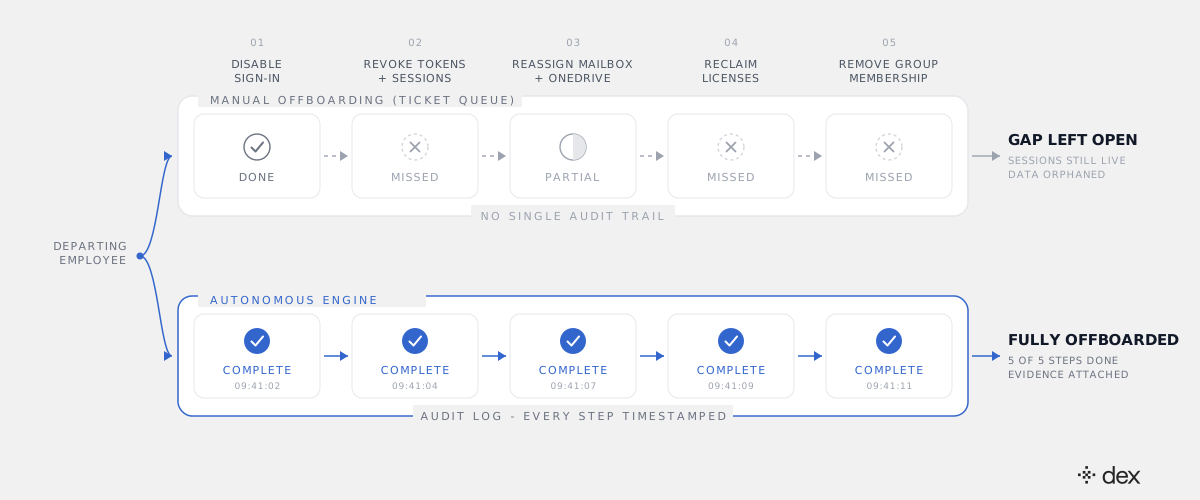
What changes when an engineer runs the checklist autonomously
Offboarding is an admin action on somebody else's account, which puts it squarely in Dex Pro, the admin console. Dex Go, the employee-facing product in Teams and Slack, can only ever act on the requesting user's own account - a boundary enforced in code, not in a prompt.
The pattern is the same one Dex applies to all of its work: investigate, plan, execute.
Investigate. Before touching anything, Dex reads the actual state of the account: group memberships and whether any are dynamic, whether the mailbox is on hold, what OneDrive holds and who else can already reach it, which enterprise apps hold delegated grants, which licenses and service plans are assigned, which devices are enrolled. Scripts skip this and assume a standard shape.
Plan. Dex sequences the steps for that specific account and surfaces the plan before it runs: secure the data, then cut the access, then reclaim the license. Where a step has a dependency - a license that cannot be unassigned until a service plan is removed - the plan reflects it.
Execute. Each action runs under an explicit policy with delegated permissions: Dex acts with the admin's own scoped authority, not a shared API key with rights over everything. No policy, no action. Dex never grants itself an admin role and never bypasses MFA. When a step errors - a transient Graph failure, a device that is offline - it retries instead of giving up on the first exception. If a step genuinely cannot complete, it escalates that step with full context rather than reporting the whole job as done.
This is the same class of work as the deeper troubleshooting and configuration Dex handles across L1 through L3. Offboarding is not a Tier 1 chat task with a Tier 1 answer; it is a multi-system engineering sequence, and treating it as less is why it keeps getting done halfway. What stops an autonomous system with this much reach from doing something destructive is the right question to ask - we answered it directly in our post on agentic IT's guardrails.
The audit trail is what makes it defensible
The security value of automated offboarding is real, but the compliance value is what usually closes the argument internally.
An access review does not ask whether you have a good offboarding process. It asks you to demonstrate, for a sample of leavers, when each element of access was removed and who removed it. If the answer lives in one admin's memory and a partial ITSM ticket, you fail the sample - not because access was still live, but because you cannot prove it wasn't.
Dex writes a timestamped record of every action to its own Activity Log, and the underlying operations land in the Microsoft 365 audit logs as well. Pulling evidence for a leaver becomes a query rather than an archaeology project. That is the broader point in the audit trail is the product: auditability is not a feature bolted onto autonomy, it is what makes autonomy acceptable to a CISO. Dex works alongside your ITSM - SysAid, ServiceNow, Jira - which stays the system of record for exceptions and approvals. The execution evidence sits underneath it.
One note worth stating plainly, since compliance is the topic: Dex's own SOC 2 Type 2 is in process, not yet held. The SysAid platform Dex is built on carries ISO 27001/27017/27018 and SOC 2 Type 2 with annual third-party audits. What Dex gives you today is the evidence layer for your own controls.
Why this compounds for MSPs
For an internal IT team, the offboarding gap is a slow accumulation in one tenant. For an MSP, it multiplies by client count.
Every client has a different offboarding standard, a different mailbox-retention expectation, and a different tolerance for how long a license stays assigned. A technician switching between tenants twelve times a day is the exact condition under which step 7 gets skipped. And when a client's auditor asks an MSP to evidence deprovisioning across 40 tenants, "we follow a checklist" is not an answer.
An autonomous engineer running the same governed sequence in every tenant, with per-tenant policy and per-tenant evidence, turns offboarding from a quality-control problem into a reported number. It is the same leverage that makes routine account work disappear, walked through step by step in how Dex Go resolves password requests in Microsoft 365.
What to do this week
Three moves, in order of effort.
Run the stale-account query. Pull every enabled account in Entra ID with no interactive sign-in in 90 days and compare it against your HR roster. Whatever falls out is your gap, measured rather than assumed.
Check whether your offboarding revokes sessions. If your runbook says "block sign-in" and stops there, add session and token revocation and clear registered MFA methods. That closes the widest hole on the list for the cost of one line in a runbook.
Decide who owns the trigger. The gap is usually a handoff problem, not an execution problem. Whether HR's termination event fires the sequence automatically or a named person owns it, the trigger has to live somewhere other than an inbox.
Offboarding is the clearest case in IT where the work is fully specified, fully repeatable, and still routinely done halfway - because it is boring, multi-system, and nobody complains when it is wrong. That is exactly the profile of work that should not be done by a person. A departed employee with a live refresh token is not a former employee. They are an unmonitored account holding your data.
Frequently asked
- What is the Microsoft 365 offboarding gap?
- The offboarding gap is the distance between an employee's last day and the moment every piece of their access is actually gone. HR marks the person as a leaver, IT disables the account, and the remaining steps - revoking refresh tokens, reassigning the mailbox and OneDrive, reclaiming the license, removing group and enterprise-app access, clearing MFA methods - get done partially, late, or not at all. The account looks closed in the admin center while parts of it are still live.
- Does disabling a Microsoft 365 account revoke active sessions and tokens?
- No. Blocking sign-in in Microsoft Entra ID stops new authentications, but it does not invalidate access tokens that have already been issued. Microsoft's documented default access token lifetime is roughly 60 to 90 minutes, and a refresh token held by a desktop or mobile client can keep renewing access until it is explicitly revoked. Revoking sign-in sessions is a separate action - it resets the token validity timestamp on the account, which is what actually cuts off existing app sessions.
- What happens to a departed employee's OneDrive and mailbox if nobody reassigns them?
- By default, a deleted user's OneDrive is retained for 30 days before permanent deletion, and their Exchange Online mailbox becomes soft-deleted on the same 30-day clock unless a hold applies. If nobody transfers ownership or converts the mailbox in that window, the data is gone - including anything the team still needed. Handled correctly, the mailbox is converted to a shared mailbox or delegated to a manager, and OneDrive ownership moves to a named owner before the retention window closes.
- What are the steps in a complete Microsoft 365 offboarding checklist?
- Block sign-in in Entra ID. Revoke sign-in sessions and refresh tokens. Reset or rotate the password. Clear registered MFA and self-service password reset methods. Convert or delegate the Exchange Online mailbox and set up forwarding if required. Transfer OneDrive and SharePoint ownership. Remove Microsoft 365 group, distribution list, Teams, and security-group memberships. Revoke enterprise-application and OAuth consent grants. Retire or wipe managed devices in Intune. Unassign licenses and adjust the subscription seat count. Record every action with a timestamp and an actor for the access review.
- How is autonomous offboarding different from an offboarding script?
- A script executes the steps it was written for and fails silently on the ones it was not - a mailbox on litigation hold, a group with a dynamic membership rule, a license that cannot be unassigned until a dependent service plan is removed. An autonomous IT engineer investigates the specific account first, plans the sequence around what it actually finds, executes each step under an explicit policy, retries around errors, and escalates the one step it cannot complete with full context attached. The output is a completed checklist and an audit record, not a log file someone has to read.