

Day one, done: automating new-hire onboarding across Microsoft 365
Microsoft 365 new-hire onboarding, from HR trigger to a provisioned day one: the full provisioning checklist, executed automatically across tenants.
New-hire provisioning is the most predictable work in IT and one of the most reliably late. The start date is known weeks in advance. The steps are the same every time. And yet a meaningful share of first mornings still involve a person sitting in an orientation session unable to open the deck, because the license landed but the mailbox has not, or the group that grants SharePoint access populates on a schedule nobody documented.
That matters more than the twenty minutes it takes to fix. Day one is the only day an employee forms an unedited opinion of how the company operates, and IT owns the whole impression. Internally it is a productivity line item. For an MSP it is a client-visible SLA event, repeated across every tenant, every week.
This post walks the complete Microsoft 365 new-hire provisioning sequence, then shows what changes when an autonomous IT engineer runs the whole thing from the HR trigger instead of from a ticket.
Why day one slips even when the date was never a secret
Onboarding does not fail because IT forgot. It fails for three structural reasons.
The trigger is human. HR knows the start date the moment the offer is signed. IT finds out when someone files a ticket, forwards an email, or mentions it in standup. The provisioning work is deterministic; the signal that starts it is not.
The sequence has real dependencies. The Exchange Online mailbox does not exist until an Exchange license is assigned. Group-based licensing depends on directory attributes being correct first. Dynamic group membership rules evaluate asynchronously, so access granted through them is not available the instant you set the department field. Do the steps out of order and you get a half-provisioned account that looks finished in the admin center.
Nothing fails loudly. A password reset that goes wrong generates a phone call within the hour. A missed enterprise-app grant generates a shrug and a workaround, and the new hire assumes that is just how it works here. The feedback loop that catches other IT mistakes is absent, so provisioning drift accumulates quietly.
The complete Microsoft 365 new-hire provisioning checklist
Here is the full sequence, in dependency order. If your runbook is shorter than this, the missing steps are being done ad hoc.
Identity and attributes
Create the user in Microsoft Entra ID against your naming convention. Set the UPN, display name, department, job title, manager, office location, and employee ID. These are not cosmetic: downstream dynamic groups, license assignment rules, and Conditional Access policies read them. Set the initial credential and issue a Temporary Access Pass so the person can complete their own MFA registration on first sign-in.
Licenses and service plans
Assign the SKU the role requires, from a pool that actually has free seats. Enable and disable individual service plans per role, because "we gave them E3" is not the same as "we gave them the right E3." Group-based licensing in Entra ID handles this cleanly at scale and requires Entra ID P1.
Groups, Teams, and site access
Add the person to security groups, Microsoft 365 groups, distribution lists, and the Teams their role uses. Grant SharePoint site permissions and confirm OneDrive is provisioned. Where dynamic rules govern membership, verify they actually evaluated rather than assuming they did.
Mailbox configuration
Once the Exchange Online license lands, configure the mailbox: aliases, shared-mailbox delegations, distribution list membership, calendar permissions, signature policy, and retention. Shared-mailbox access is the single most-forgotten step in most onboarding runbooks.
Application access
Grant the enterprise applications and third-party SaaS the role needs - Jira, Salesforce, Okta, the line-of-business tool that only three people understand. Each has its own role model, and none of them inherit from Entra ID unless someone wired them to.
Device and MFA posture
Assign the Intune enrollment or Windows Autopilot profile, apply the compliance policy, and confirm the account satisfies your Conditional Access baseline. Then actually verify sign-in works, on the device, before the start date.
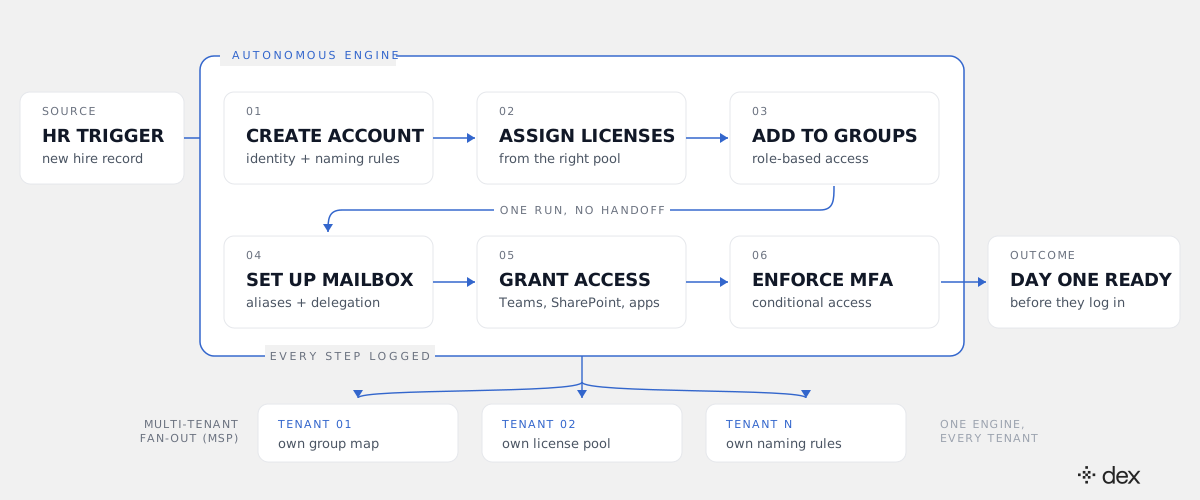
What changes when an engineer runs the sequence instead of a person
Dex is an autonomous IT engineer for Microsoft 365, and onboarding is close to a perfect fit for what agentic IT actually means: it investigates the environment, plans the sequence, and executes the changes itself.
The investigate step is the part scripts skip. Before it creates anything, Dex reads the tenant it is working in: the naming convention already in use, which license pools have free seats, which groups govern the target role, what the Conditional Access baseline requires. Then it plans a sequence around what it found, rather than replaying a sequence someone wrote against last year's configuration.
Execution is where the L1-to-L3 range matters. Creating a user and assigning a license is routine work. Untangling a license assignment that fails because a dependent service plan is still enabled, or a dynamic group that will not evaluate because an attribute is malformed, is Tier 2 and Tier 3 troubleshooting - and it is where onboarding actually stalls in practice. Dex resolves L1 through L3 across that surface, with a target of 90%+ end-to-end autonomous resolution. What it cannot complete under policy it escalates with the diagnosis attached and the rest of the sequence finished.
And the trigger stops being human. The new-hire record in your HR platform already holds the name, start date, department, title, manager, and location. That record is the trigger. Dex Pro can stand up an integration to an HR system with a REST API mid-conversation, so this does not wait on a connector roadmap.
Governed autonomy, because this is identity creation
Provisioning is the most sensitive automation an IT team will hand over, because the output is a new identity with standing access. Two properties make it defensible.
Every action must match an explicit policy. Dex enforces this in the execution layer, not in a prompt, across a six-layer model that runs from global rules down to the individual action. No matching policy means no action, which is what stops "onboard the new sales rep" from quietly resolving into an over-permissioned account because a group name looked close enough.
It acts with delegated permissions - the admin's own authorization, scoped to what that admin can already do - rather than a broad application key. It never bypasses MFA and never grants an admin role to get a step unstuck. And every step lands in an audit record with a timestamp and an actor, in both the Microsoft 365 logs and Dex's own activity log. When an access reviewer asks why this person is in that security group, the answer is a policy reference and a log line, not a recollection.
Worth saying plainly: Dex works alongside your ITSM rather than replacing it. If your onboarding request lives in SysAid, ServiceNow, or Jira today, that stays the system of record. What changes is that the record documents completed work instead of queuing it.
Why this compounds hardest for MSPs
For an internal IT team, autonomous onboarding recovers an hour per hire and removes a recurring embarrassment. For an MSP it changes the unit economics.
Onboarding is per-tenant work that arrives unpredictably and cannot be batched. Every client has its own naming convention, license pool, group map, and Conditional Access baseline, which is exactly why a provisioning script written for one tenant is dangerous in the next. So MSPs either maintain per-client runbooks that drift, or assign whichever technician is free and accept variance in a client-visible moment.
An engineer that reads each tenant's real configuration before acting removes the tradeoff. One onboarding request fans out correctly across forty tenants without forty scripts, which is the same curve described in what changes when one engineer runs 40 M365 tenants and the broader pattern in how MSPs scale IT support without hiring.
The recovered capacity tends to go straight into billable work. Cliff DuPuy, Director of IT at Grand Traverse County, put the effect this way: "Dex helped us unlock $67K in value in a single day."
What to do this week
Three concrete steps, in order.
Write down your actual onboarding sequence. Not the runbook in the wiki - the real one, including the steps that live in one senior admin's head. Most teams discover their documented process is missing four or five items, and shared-mailbox access is usually one of them.
Instrument the gap between start date and full provisioning. For the last ten hires, measure when each was fully provisioned against when they started. If you cannot reconstruct it from logs, that is the first finding.
Fix the trigger before you automate the steps. Automating a sequence that still starts with a forwarded email just makes a late process faster. The HR record is the event worth building on.
Onboarding is not hard work. It is sequential, dependency-laden, unforgiving work that arrives at the worst possible moment and is graded by someone forming their first impression of the company. That is precisely the kind of work that should not require a person - and precisely the kind an engineer should finish before anyone asks whether it is done.
Frequently asked
- What does Microsoft 365 new-hire onboarding actually involve?
- Create the user in Microsoft Entra ID with the correct naming convention and directory attributes. Assign the right license SKU with the right service plans enabled. Add the person to security groups, Microsoft 365 groups, distribution lists, and Teams. Provision the Exchange Online mailbox with its aliases, delegations, and calendar permissions. Grant SharePoint, OneDrive, and enterprise-application access, plus any third-party SaaS the role needs. Enroll and configure the device in Intune. Register MFA and confirm the account satisfies your Conditional Access policies. Then verify the person can actually sign in. That is roughly a dozen actions across six or seven Microsoft surfaces, and most of them have to happen in order.
- How long does it take to provision a new employee in Microsoft 365?
- The hands-on admin work is typically half an hour to an hour per hire when nothing goes wrong. The calendar time is what hurts: the request usually arrives a day or two before the start date, licenses may need to be purchased, dynamic group membership rules populate asynchronously, and the mailbox is not created until an Exchange Online license is assigned. That is why a start date that was known for three weeks still produces a first morning where the laptop signs in but SharePoint does not.
- Can new-hire onboarding be automated from an HR system trigger?
- Yes. The new-hire record in the HR system already contains everything the provisioning sequence needs: legal name, start date, department, job title, manager, and location. An autonomous IT engineer can take that record as the trigger, derive the role's entitlements from policy, execute the full provisioning sequence, and log every action. Dex Pro can build an integration to an HR platform with a REST API mid-conversation, which means the trigger does not depend on a pre-built connector existing for your specific HRIS.
- How do you set up MFA for a new hire before their first login?
- You cannot register someone else's authenticator app for them, so the standard approach is a Temporary Access Pass in Microsoft Entra ID: a time-limited passcode that lets the new hire complete their own MFA registration on first sign-in without needing an existing second factor. Combined with a Conditional Access policy that requires registration before granting broader access, the new hire arrives at a compliant account they finish securing themselves. Dex issues the pass and enforces the policy. It never registers a factor on the user's behalf and never grants an admin role to make a step easier.
- How do MSPs handle new-hire onboarding across multiple Microsoft 365 tenants?
- Badly, in most cases, because each tenant has its own naming convention, license pool, group map, and Conditional Access baseline. A script written for tenant A quietly does the wrong thing in tenant B. An autonomous IT engineer handles this by reading each tenant's actual configuration before it acts and applying that tenant's policy, so one onboarding request fans out correctly across forty tenants without forty scripts to maintain. That is the same per-tenant economics that governs every other kind of MSP work.
- What happens when a provisioning step fails partway through?
- This is the difference between a script and an engineer. A script fails at step 4 and leaves a half-provisioned account with a license assigned, no mailbox, and no group membership. An autonomous IT engineer investigates the failure, retries around it where it can (a license pool with no free seats, a dynamic group that has not populated yet, a service plan dependency blocking assignment), and escalates the one step it cannot complete with full context attached and the rest of the sequence finished. You get a named blocker instead of a mystery.