

The MSP onboarding backlog: what 40 tenants of pending access requests actually cost you
Multi-tenant IT automation for MSPs, priced out: what a 40-tenant access-request backlog costs in engineer hours and churn, and how Dex clears it.
Cliff DuPuy, Director of IT at Grand Traverse County, an MSP, put a hard number on what happens when the routine queue stops owning an engineering team: "Dex helped us unlock $67K in value in a single day." That number is worth holding next to a less flattering one. Every MSP running dozens of Microsoft 365 tenants carries a standing pile of pending access requests, a few per client, invisible at the tenant level and expensive in aggregate. This post prices that backlog across a 40-tenant book, shows where the money actually leaks (labor, margin, and churn), and explains how multi-tenant IT automation for MSPs clears it before it costs you a client.
The backlog starts the day after go-live
Most MSP economics conversations focus on day one: winning the client, standing up the tenant, getting the security baseline in place. That work is real, and we have covered it. But onboarding is a project with an end date and, usually, a line on the invoice.
The access backlog has neither. It starts the morning after go-live and runs for the life of the contract:
- A new project team needs a Teams channel and a SharePoint site with the right members.
- A sales hire needs the shared mailbox, the CRM, and the pricing folder.
- A contractor needs guest access for six weeks, then needs it removed.
- A promotion means new group memberships, a different license, and one old permission that should have been revoked.
- Someone gets a "you don't have access" error and nobody can say which nested group was supposed to grant it.
None of these is hard on its own. Each one requires a technician to switch into that client's tenant, find the client's approval rules, confirm who should get what, make the change, and document it. Multiply by every client, every week, and you get the gap between winning a client and running them profitably.
A working model: 40 tenants, 800 requests a month
Here is an illustrative model. Use your own PSA data for the real case; the shape of the math transfers.
The book. 40 Microsoft 365 tenants, averaging 75 seats each. That's 3,000 seats under management.
Volume. Access work (group and Teams membership, SharePoint and OneDrive permissions, shared mailboxes, license changes, SaaS app access, guest accounts) runs at roughly one request per four seats per month. Round that to 20 requests per tenant per month, 800 across the book.
Engineer time. The change itself takes five minutes. The rest is overhead: switching tenants, checking the client's documentation, confirming approval, logging the work in the PSA. Call it 18 minutes per request, all in.
800 requests  ×  18 min  =  240 hours / month
240 hours     ÷  160     =  1.5 full-time engineers
240 hours     ×  $60     =  $14,400 / month loaded
                            $172,800 / year
That is a full senior technician and half of another, doing work that rarely shows up as its own budget line. On a flat-fee managed services contract, none of it is billable.
Why 40 small queues hurt more than one big one
The access backlog does not look like a crisis, and that's why it compounds. Any single tenant might have two or three pending requests. That looks fine on a dashboard. Across 40 tenants, though, there are 100 or more open requests at any moment, and the busiest clients (a reorg, a new office, a project kickoff) spike to 20 deep while everyone else waits behind them.
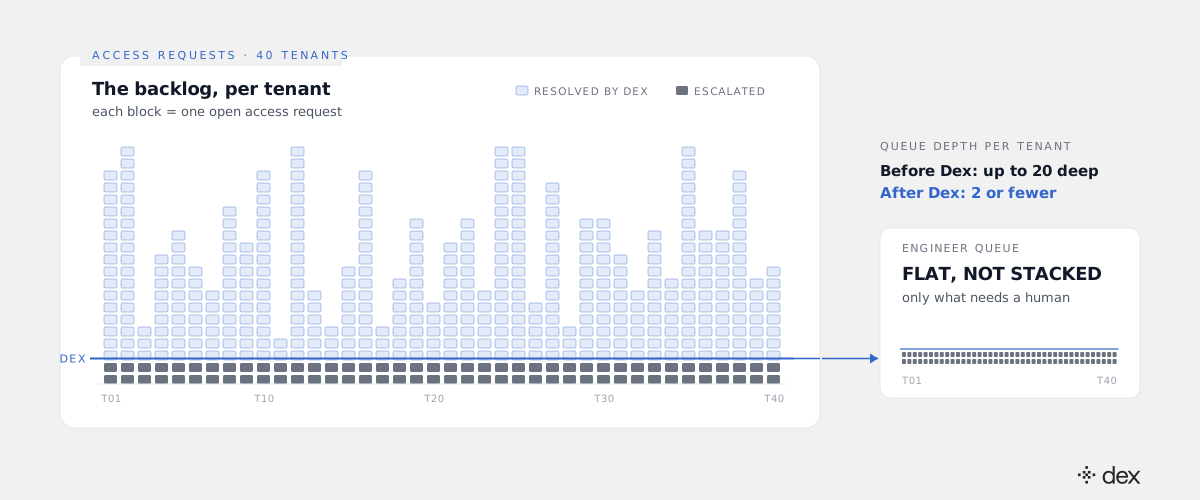
Three things make the multi-tenant version worse than the in-house version:
Context switching is per tenant, not per request. An in-house engineer works one directory with one set of rules. An MSP technician working the queue jumps between client environments, each with its own naming conventions, group structure, and approval contacts. The switch costs more than the fix.
Prioritization defaults to whoever is loudest. With 40 queues, the client who calls gets served. The client who quietly waits for three days registers it as how your service works.
Nobody owns cleanup. Granting access is urgent, so it gets done. Removing access is not, so it doesn't. The guest account from last spring and the license on the person who left in March sit there until an audit finds them, and the audit finding lands on your name.
Where the backlog turns into churn
The labor number is the visible cost. The bigger one shows up at renewal.
Clients rarely leave an MSP over a single outage. They leave over a pattern: the new hire who couldn't open the shared drive for two days, the manager who asked for a channel and had to ask again. Access requests sit at the exact point where your client's employees feel your service most often. A slow access queue is your service quality, as the client experiences it.
Extend the model. At 75 seats and roughly $40 per seat per month, each client is worth about $36,000 a year. If responsiveness costs you two of 40 clients a year, that's $72,000 in lost recurring revenue, before the sales and onboarding cost of replacing them.
$172,800   engineer time on access work
 $72,000   recurring revenue lost to two churned clients
────────
$244,800   annual cost of the backlog, 40-tenant book
Your numbers will differ. The pattern doesn't: the backlog costs a salary in labor and a salary in churn, and neither shows up as a line item.
How Dex clears the backlog before it reaches an engineer
Dex is the world's first autonomous IT engineer for Microsoft 365. It doesn't route the access request to a technician faster. It does the work.
For each request, Dex investigates the current state in that client's tenant: who is asking, what they already have, and which group, role, or app assignment actually grants the access. It plans the change against that client's policy. Then it executes the change in Entra ID, SharePoint, Exchange Online, Teams, or the connected SaaS app, and closes it with a full audit trail. No ticket waits in a queue, because the request is resolved before one would have been filed.
This isn't limited to the easy requests. Dex resolves L1 through L3: the routine membership and license changes, and also the Tier 2 and Tier 3 work behind them. That includes tracing why an inherited permission is failing, fixing a Conditional Access policy that blocks a contractor, and untangling nested groups nobody has documented. Only genuine judgment calls escalate, and they arrive with the investigation already done.
Re-run the model with 90% of access requests resolved end-to-end:
800 requests  ×  10% escalated  =  80 requests / month
 80 requests  ×  18 min         =  24 hours / month
That takes access work from 240 engineer hours a month to 24, and queue depth from up to 20 per tenant to two or fewer. The client experience changes with it: access arrives in minutes, the same way for every tenant, whether or not the client called.
Per-client policy is what makes this safe across 40 tenants
The natural MSP objection is that 40 clients means 40 sets of rules. That's exactly why the control model matters.
Every action Dex takes must match an explicit policy. No policy, no action, and that is enforced in code, not in a prompt. Each client tenant carries its own policy set, so the same autonomous engineer grants finance-folder access freely at one client and routes it to the CFO for approval at the next. Dex acts through delegated permissions in each tenant rather than one shared API key, keeps each organization's data in an isolated database with its own encryption keys, never grants admin roles, and never bypasses MFA. Every change lands in the client's Microsoft 365 audit log and in Dex's activity log.
For MSP engineers, that console is Dex Pro, the admin console for multi-tenant Microsoft 365 operations. It shows every action before it runs, and "Approve Always" covers the repeat patterns, so a technician approves a category of change once instead of one request at a time. The job shifts from clearing 40 queues to writing 40 policies and reviewing the exceptions.
What the recovered hours are worth
The Grand Traverse number is the useful frame here. The full story is in the $67,000 day at Grand Traverse County, and the point is that the value came from what the team did once the routine work was gone, not from the cost removed.
For an MSP, recovered hours have a rate card. The 216 hours a month that stop going to access requests can go to projects you have been turning down, security reviews you can bill, and the next 10 clients you couldn't take on without hiring. Clear the backlog and the margin goes back into the business. So does the client relationship that was quietly eroding three days at a time.
To size this for your own book, pull three numbers from your PSA: access requests per tenant per month, average time to close, and how many clients cited responsiveness at their last renewal. That's the backlog's real cost, and it's the case for running every tenant with an engineer that doesn't queue.
Frequently asked
- What does an access-request backlog cost an MSP?
- In a working model of 40 Microsoft 365 tenants averaging 75 seats each, roughly 800 access requests arrive per month. At about 18 minutes of engineer time per request once tenant context-switching is included, that is around 240 hours a month, or 1.5 full-time engineers, worth roughly $170,000 a year in loaded labor. Add the churn risk from clients who read a slow queue as poor service and the total commonly passes $240,000 a year. Swap in your own volumes; the structure of the math holds.
- What is multi-tenant IT automation for MSPs?
- Multi-tenant IT automation is the ability to resolve routine and complex IT work across many client environments from one place, without a technician logging in to each tenant by hand. Dex does this with Dex Pro: it acts through delegated permissions in each client's Microsoft 365 tenant, enforces a separate policy set per client, and keeps each organization's data in an isolated database with its own encryption keys.
- Which access requests can Dex resolve without an engineer?
- Dex resolves L1 through L3. That covers group and Teams membership, SharePoint and OneDrive permissions, shared mailbox access, license assignment, and SaaS app access, plus the deeper Tier 2 and Tier 3 work behind them: tracing why access was denied, fixing a Conditional Access policy that blocks a contractor, untangling nested group inheritance. Requests that fall outside policy or need a client-side decision escalate with the full investigation attached.
- Who approves sensitive access grants for a client?
- The person the policy names. Each client tenant carries its own policy set, and a policy can mark specific resources, roles, or apps as approval-required. Those requests route to the named owner, such as the client's IT contact or a data owner, before anything executes. Dex never grants admin roles and never bypasses MFA, and every action lands in both the Microsoft 365 audit log and Dex's own activity log.
- How is the ongoing access backlog different from new-client onboarding?
- New-client onboarding is a one-time project: discovery, security baseline, users, and licenses. The access backlog is the permanent flow of requests that starts the day after go-live and never stops. Onboarding is a cost you can quote. The backlog usually sits inside a flat monthly fee, so every hour it consumes comes straight out of margin.