

Beyond the password reset: 5 everyday IT requests an autonomous engineer closes end to end
Five everyday Microsoft 365 IT requests an autonomous IT engineer resolves end to end - what each one takes, the audit trail, and where a human steps in.
Ask an IT leader which request their team wants automated first and the answer is almost always the password reset. It is the right instinct applied to the wrong scope. Password resets are the most visible slice of the L1-L3 queue, not the largest one, and an organization that automates only password resets has removed one line from a queue that has five.
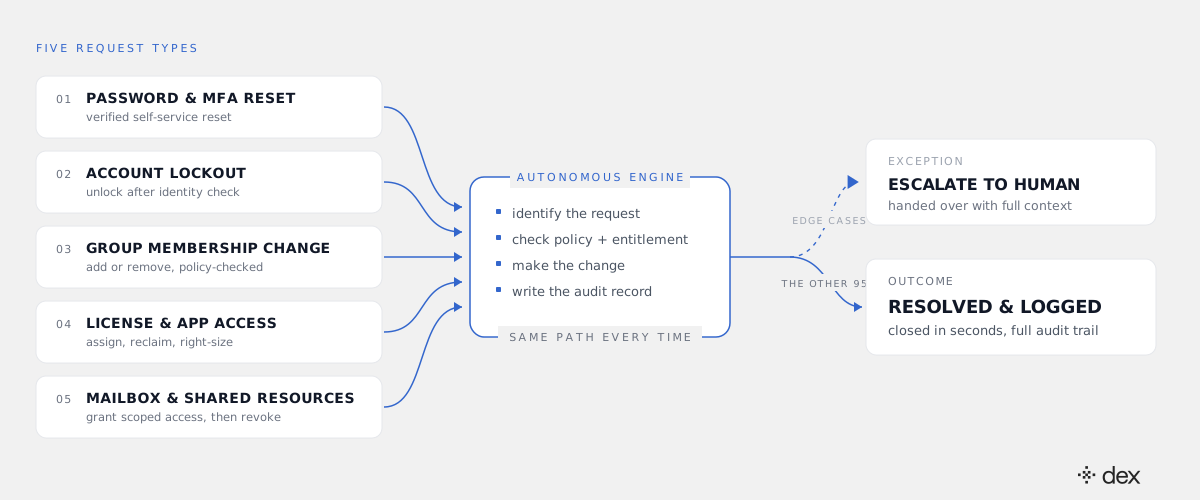
This post walks through the five highest-volume Microsoft 365 request types an autonomous IT engineer closes end to end: password and MFA resets, account lockouts, group and distribution-list changes, license and app-access requests, and mailbox or shared-resource permissions. For each one: what "end to end" actually requires, what the audit record looks like afterwards, and the specific cases where a human still has to step in. If you are building an automation roadmap, this is the shape of the work.
Why the password reset became the poster child
The password reset won the automation conversation because it is the easiest request to explain, not because it is the biggest line in the queue. Everyone has experienced one, it has a clean before and after, and it has a published cost benchmark attached. Every M365 tenant also ships with self-service password reset, so the problem already feels half solved.
It is, for the clean case. SSPR handles the user who remembers their second factor and resets without help. It does not handle MFA loss, lockouts after repeated failures, Conditional Access interactions, or resets that need manager confirmation. But the residue is not the interesting part. The interesting part is that identity is only one of four surfaces the routine queue touches. Group membership, licensing, and resource permissions generate comparable volume, get less attention, and carry more governance risk.
What "end to end" means here
End to end has a specific definition in this post, and it is narrower than most vendor usage. It means the system investigates the environment, plans the change, executes it against the real backend, and writes the audit record. Routing the user to a knowledge base article does not count. Neither does producing a better-formatted ticket, or recommending the fix to an engineer who then performs it.
Dex measures itself against a 90%+ end-to-end resolution rate on this surface, and the scope is L1 through L3 - routine identity work and the deeper configuration and troubleshooting cases that used to require a senior tech. What escalates is judgment, not difficulty. For the category definition and how to interrogate a vendor's autonomy claim, see what agentic IT actually is.
1. Password and MFA resets
The employee messages Dex Go in Teams or Slack. Dex verifies identity according to the tenant's policy, resets the credential or re-registers the authentication method in Entra ID, confirms the user is back in, and logs the action. No ticket is opened.
Two constraints matter here. First, Dex Go can only act on the requesting user's own account, enforced as a hard boundary rather than a guideline. Second, Dex never bypasses MFA. An MFA reset re-registers methods after the identity checks your policy demands; it does not step around the control. The full step-by-step version of this flow is in how Dex Go resolves password requests in Microsoft 365.
Where a human steps in: verification signals conflict, the sign-in risk score is elevated, or the account is flagged as privileged. Those cases stop and escalate with the verification trail attached.
2. Account lockouts
A lockout looks like a password problem and is usually a different problem. The user often knows their password perfectly well; the account is locked by Entra ID Smart Lockout after repeated failures, by a Conditional Access rule the user tripped, or by a risky sign-in detection. Unlocking without reading the cause is how you unlock an account for an attacker.
So the investigation comes first: which policy fired, from which locations and devices, over what window, and whether the pattern is one confused user on a new phone or credential stuffing from three countries. If it is benign, Dex clears the lockout, revokes stale sessions where policy calls for it, and walks the user back in. If it is not, nothing gets unlocked.
Where a human steps in: the sign-in pattern looks like an active attack. That goes to security with the timeline, not to the help desk with an unlock.
3. Group and distribution-list changes
This is the quiet giant of the queue. "Add me to Finance-Reporting." "Create a DL for the migration project." "Why can't I post in this channel?" Individually trivial, collectively enormous, and almost never tracked as its own category.
Group changes also cross a boundary that password resets do not: adding someone to a group changes what they can see. That makes it Dex Pro work rather than self-service. Dex Pro runs on the admin's delegated permissions, matches the request against target rules and department policy, obtains owner approval where the policy requires one, then executes against the Entra ID security group, the Exchange Online distribution list, or the Teams-backed M365 group. The record shows who asked, which rule matched, who approved, and what changed.
Where a human steps in: the group grants standing access to regulated data, or it is a role-assignable group. Privileged group membership is never automated.
4. License and app-access requests
"I need Power BI." "Can I get Visio?" The naive automation assigns the license. The useful one asks four questions first: is the requester's department entitled to this SKU, is there a spare seat, is a cheaper SKU already assigned to them that covers the need, and is there a dormant seat that should be reclaimed instead of a new one purchased.
That investigation is the whole value: it is the difference between an automation that resolves requests and one that inflates the M365 bill. Dex checks entitlement and seat inventory, assigns the license and the app-access group, confirms to the requester in Teams, and logs the assignment against the rule that permitted it. The reclamation side of the same ledger is covered in how to reclaim unused M365 licenses.
Where a human steps in: no seats remain and a purchase is required. That goes to whoever owns the budget, with the utilization numbers attached so the decision takes a minute instead of a week.
5. Mailbox and shared-resource permissions
Shared mailbox access, calendar delegation, send-as rights, SharePoint site and library permissions, meeting-room booking. This is the most sensitive of the five: send-as is an impersonation grant, and shared mailbox access is a data-access grant. Both get handed out casually in most organizations and reviewed almost never.
Under governed autonomy the sequence is: confirm the requester's business need against policy, obtain the mailbox or data owner's approval where required, execute the permission change in Exchange Online or SharePoint, set an expiry when the policy defines the access as temporary, and log all of it. The expiry is the part manual processes almost always drop.
Where a human steps in: send-as on an executive mailbox, anything on a mailbox under legal hold, and anything involved in an open investigation. Those are policy-excluded by default.
Where a human still steps in, in general
Across all five categories the escalation triggers reduce to four patterns:
- No policy covers the request. No policy, no action. This is enforced at the code level, not as a prompt instruction, so it cannot be talked around.
- The action would escalate privilege. No admin role grants, no MFA bypasses, no privileged group changes.
- A security signal is present. Risky sign-ins, impossible-travel patterns, and anything that smells like account takeover route to security rather than resolving.
- The case needs architectural judgment. Novel problems, tenant-wide changes, anything where the right answer depends on where the organization is going.
The quality bar for an escalation is that it arrives finished on the investigation side: what was checked, which logs were read, which policy blocked, what the proposed change was. Ten percent of the volume arriving with the diagnosis done is a different job from ten percent arriving as a fresh ticket.
The audit trail is the deliverable, not the byproduct
Autonomy without a record is not something an auditor will accept, and it is not something a security team should. Every action Dex takes lands in two places: Microsoft 365's own audit logs, and the Dex Activity Log. Between them you can answer the five questions any access review asks - who requested it, what changed, under which policy, who approved, and when it expires or was reversed.
Dex also holds zero retention on M365 data: it reads what the task requires and discards it. On certifications, Dex is built by the team behind SysAid, whose platform carries ISO 27001 and SOC 2 Type 2 attestations; Dex's own are in process, and we would rather say that plainly than let a logo imply otherwise.
What to do Monday
Three concrete moves, in order.
Pull the last 90 days of requests by type, not by tier. Tier is an internal routing label and it hides the categories above. Sort into identity, group, license, and permission buckets and the roadmap usually writes itself.
Rank each category by policy clarity, not by volume. The request type you can automate first is the one where you can already state the rule in a sentence. Volume tells you the prize; policy clarity tells you the order.
Write the policy before you buy the automation. Once routine execution is handled, the constraint on your IT throughput stops being engineer hours and becomes the precision of your policies. That is a much better problem, and it is the argument in L1 is a tax, and how to stop paying it.
To watch this run against a real tenant rather than read about it, we walk the full flow, escalation path included, on the next Dex webinar. The Dex Go and Dex Pro pages cover the employee side and the admin side.
The password reset was never the point. It was the request small enough that the industry agreed to automate it. The rest of the queue is the same shape: bounded, repetitive, policy-describable work that has been consuming senior engineers because nothing else was available to do it.
Frequently asked
- Which IT requests can an autonomous IT engineer resolve without a human?
- Any request that is policy-bounded and executable against a real system. In a Microsoft 365 environment the five highest-volume categories are password and MFA resets, account lockouts, group and distribution-list changes, license and app-access requests, and mailbox or shared-resource permissions. Dex resolves L1 through L3 work in these categories end to end - it investigates the environment, plans the change, executes it in Entra ID, Exchange Online, SharePoint or Intune, and writes the audit record. Requests with no matching policy, or that would escalate privilege, do not execute.
- Can an autonomous IT engineer reset MFA without weakening security?
- Yes, because resetting MFA and bypassing MFA are different operations. Dex never bypasses MFA and never grants admin roles. An MFA reset re-registers the user's authentication methods after the identity checks your policy requires, which can include a manager confirmation, a second verified channel, or a clean sign-in risk signal. If those checks do not pass, the request escalates instead of executing.
- Who approves a group membership or license change when there is no ticket?
- The policy does, and the named approver it points to. Dex Pro runs on delegated permissions and a six-layer policy model, so a group change either matches an explicit rule - this department, this group, this requester - or it stops. Where the policy requires a human approver such as a group owner or data owner, Dex requests that approval before executing and records who granted it. No policy means no action, enforced at the code level rather than in a prompt.
- Does this replace our ITSM?
- No. Dex works alongside your ITSM and treats it as the system of record. The change is what reaches the queue: routine identity, group, license and permission work resolves before a ticket is opened, so the ITSM holds the exceptions, the approvals, and the escalations that genuinely need a human. Dex integrates with SysAid, ServiceNow and Jira for exactly that reason.
- What happens when a request falls outside policy?
- It escalates, and the escalation carries the investigation with it. The engineer who picks it up sees what was checked, which logs were read, which policy blocked the action, and what the proposed change was. That is the difference between an escalation and a handoff: nobody has to ask the user the same three questions again.