

License creep: reclaiming the Microsoft 365 seats you're overpaying for
Unused Microsoft 365 licenses quietly inflate cost. How license creep accumulates, and how an autonomous IT engineer reclaims idle seats continuously.
Microsoft 365 license waste is the rare IT cost problem where nobody made a mistake. Someone provisioned a seat for a contractor who finished in March. Someone bought Entra ID P2 as a standalone before the tenant moved to E5, which already includes it. Someone put the whole finance team on the premium tier because it was easier than deciding user by user. Each decision was defensible. Added up over three years, they are a five-figure annual line item nobody owns.
This post covers where license creep comes from, what it costs on a real tenant, and why the audit that would fix it almost never happens twice. Then the part that matters: what changes when a system continuously watches assignment against usage, reclaims idle seats under policy, right-sizes SKUs, and reports the savings in dollars. For MSPs, that shift moves license hygiene out of the "we should really do that" pile and into the margin column.
What license creep actually is
License creep is the growing gap between the seats you pay for and the seats anyone uses. It is not one thing, it is four, and they compound:
- Orphaned seats. The user left, the account was disabled or deleted, the license was never unassigned. Disabling an account does not release its license.
- Idle seats. The account is live but nobody has signed in for weeks. Contractors, seasonal staff, service accounts, the shared laptop in the warehouse.
- Duplicate entitlements. A standalone add-on sitting on top of a bundle that already includes it. Entra ID P2 alongside Microsoft 365 E5 is the classic. So is a standalone security add-on bought during an incident and never reconciled after the tenant upgraded.
- Over-provisioned tiers. A user on E5 who has never opened a single E5-only capability. The delta between E3 and E5 at list pricing is roughly $21 per user per month. On 90 users that is $22,680 a year for features nobody touched.
The reason this list is worth writing down is that each category needs a different remedy. Orphaned seats get unassigned. Idle seats get a grace window and then reclaimed. Duplicates get removed. Over-provisioned tiers get stepped down. A single "unused license report" flattens all four into one number and gives you no action.
A worked model on a 480-seat tenant
Take a tenant with 480 assigned seats, mostly Microsoft 365 E3 with an E5 population in leadership, security, and finance. Usage reports show 300 accounts active in the last 30 days.
120 idle seats. No interactive sign-in and no service activity for 30-plus days. At E3 list pricing of about $36 per user per month, that is $4,320 a month, or $51,840 a year.
60 duplicate entitlements. Standalone add-ons overlapping bundles the tenant already pays for. At a blended $12 per seat per month, $720 a month.
90 right-size candidates. Active E5 users whose 90-day activity never touches an E5-only capability. Step down to E3 and the saving is about $21 each, or $1,890 a month.
That is roughly $6,900 a month, just over $83,000 a year, on one tenant of 480 seats. No new tooling, no negotiation, no headcount change. The money was already yours; it was leaking through the assignment layer.
Two caveats that make the number honest. First, right-sizing is the category most likely to shrink under review - some of those E5 seats exist for a compliance or Conditional Access reason that usage data will not show you, which is exactly why a human confirms the policy once and the machine applies it afterward. Second, unassigning a license frees it for reuse immediately, but it only reduces your invoice if you reach the renewal boundary with the seat count already trimmed. Under Microsoft's New Commerce Experience, annual-term subscriptions lock seat counts for the term after a short reduction window. Continuous reclamation is what gets you to renewal day with an accurate number. An annual audit gets you a spreadsheet.
Why the audit never gets done twice
Every IT team has done a license audit. Almost none have done a second one on schedule.
It is not laziness. The first audit is a project with a sponsor and a finish line. The second one is maintenance, and maintenance loses to whatever is on fire. Meanwhile the inputs never stop moving: people join, leave, change roles, go on leave, come back. Licenses get assigned directly, through groups, through a service desk workflow, and sometimes by a manager with delegated rights nobody remembers granting. Every one of those paths creates drift between the last audit and today.
There is also a quiet asymmetry in the incentives. Removing a license from someone who turns out to need it generates an angry ticket with your name on it. Leaving it assigned generates nothing at all. Nobody gets paged for an unused license. That is precisely why they accumulate.
The structural fix is not a better report. It is making reclamation a continuous background process with a policy behind it, so the decision is made once and applied forever.
What continuous reclamation looks like
This is the work Dex does as an autonomous IT engineer for Microsoft 365: it investigates, plans, and executes, rather than producing a report for someone else to act on.
Investigate. Read assigned licenses per user from the tenant, then join that against Entra ID sign-in history, per-service activity in Exchange, SharePoint, OneDrive and Teams, mailbox type and staleness, and entitlement overlap between bundles and standalone SKUs. One pass, all tenants, on a schedule.
Plan. Sort every seat into the four categories above, apply the exclusion lists and grace windows the admin defined, and produce a change set with a dollar value attached to each line.
Execute. Unassign the idle seats while preserving the mailbox, drop the duplicate add-ons, step the over-provisioned users down a tier, and log every change. Then report what was reclaimed, in dollars, per tenant.
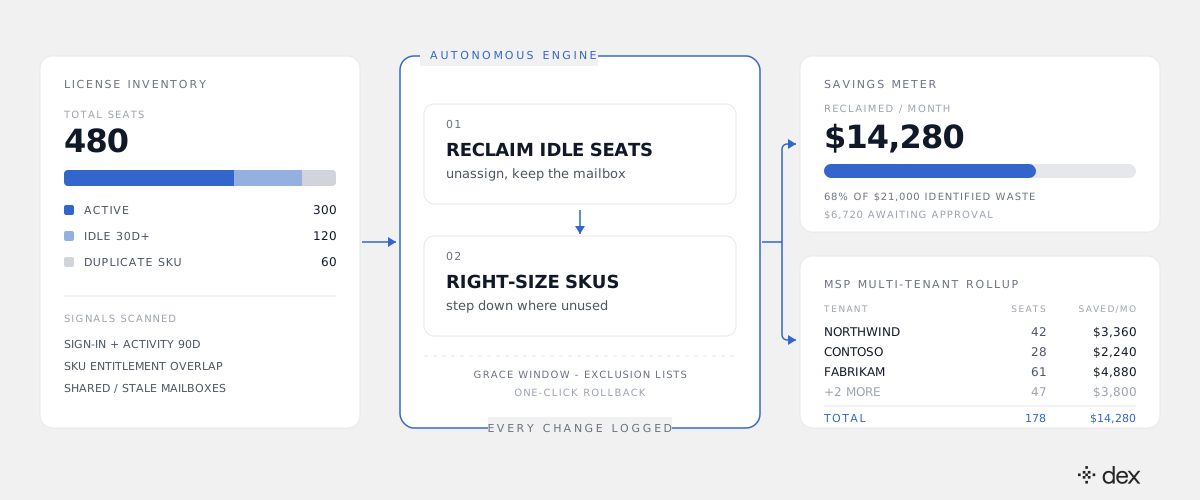
Note what is deliberately not automatic in that flow. Reclamation runs against a policy, and in Dex every action must match an explicit policy - no policy, no action, enforced in the execution layer rather than in instructions a clever prompt could talk around. Admins get a grace window before any seat is touched, named exclusion lists for executives and service accounts, and one-click rollback. In the Dex Pro console, an admin sees the full change set before it runs and can approve the whole batch once with "Approve Always" for the recurring pattern. That is governed autonomy, not a cron job with delete permissions.
Reclamation is also not a special-case feature bolted onto a helpdesk bot. It sits in the same L1 through L3 surface Dex already runs: the same engine that handles a password reset or an MFA recovery also does entitlement reconciliation and tier right-sizing, which is Tier 2 and Tier 3 work in most orgs. We wrote up the economics of that surface in the IT helpdesk math.
The MSP version: license hygiene as a margin lever
For an MSP, everything above multiplies by tenant count, and the constraint is exactly the one described in the MSP tenant math: a technician can only hold so many tenants in their head. License hygiene is the first thing dropped when a tech is covering forty tenants, because it is invisible and never urgent.
Run it continuously across the book and the arithmetic changes shape:
- On flat-fee contracts where you resell licenses, reclaimed seats reduce cost of goods and drop straight into margin.
- On pass-through contracts, the savings go to the client, and your quarterly business review leads with a documented cost reduction instead of a ticket-count chart. That is a retention argument that survives a procurement review.
- On new logos, a first-week reclamation pass often pays for a meaningful share of the managed-services fee. It is the cleanest possible proof of value in month one.
Cliff DuPuy, Director of IT at Grand Traverse County, an MSP, put the general version of this plainly: "Dex helped us unlock $67K in value in a single day." Reclamation is one of the most mechanical ways to get there, because the waste is already sitting in the tenant waiting to be found.
None of this displaces your ITSM. Your service desk stays the system of record for approvals and change history; Dex works alongside it and writes what it did into both the Microsoft 365 audit log and its own Activity Log. If you want the broader pattern for how this compounds across a book of business, see how MSPs scale IT support without hiring.
What to do this week
Three concrete steps, in order:
- Get your renewal dates. Reclamation only converts to cash at a renewal boundary. Find the boundary first, then work backwards.
- Pull one join, not one report. Assigned licenses joined against 30-day sign-in and per-service activity. If the idle count is over 10% of assigned seats, you have a maintenance problem, not a procurement problem.
- Write the policy once. Which groups are exempt, how many days of inactivity trigger reclamation, what happens to the mailbox, who approves a tier step-down. Once that exists, the recurring work can be delegated to something that never forgets to run it.
You can start on the Dex side free: start with Dex and point it at a tenant, or join the next Dex webinar to see a reclamation pass run end to end.
License creep is not a budgeting failure. It is what happens when the only thing standing between your tenant and its invoice is a human remembering to check.
Frequently asked
- How do I find unused Microsoft 365 licenses?
- The raw signals live in two places. The Microsoft 365 admin center usage reports give you last-activity dates per service (Exchange, SharePoint, OneDrive, Teams), and Entra ID sign-in logs tell you whether the account authenticated at all. Cross-reference assigned licenses against both: a seat with no interactive sign-in for 30-plus days and no service activity is an idle seat. The hard part is not finding them once, it is finding them every week without a human running the report.
- How much of a typical Microsoft 365 spend is wasted on unused or over-provisioned licenses?
- Most environments that have never been audited carry somewhere between 10% and 25% waste across three categories: seats assigned to people who have left or gone inactive, add-on SKUs that duplicate entitlements already included in a bundle, and users on a premium tier who only ever use the features of a cheaper one. The percentage grows with tenant age and with how many people have license-assignment rights. It is not a procurement failure, it is a maintenance failure.
- Can you reduce Microsoft 365 seats mid-term?
- Usually not, and this is the detail that decides whether an audit is worth money. Under Microsoft's New Commerce Experience, annual-term subscriptions have a short cancellation and seat-reduction window measured in days from purchase or renewal, after which the seat count is committed for the term. Unassigning a license frees it for reuse immediately, but it only reduces the bill if you catch it before the renewal boundary. Confirm the exact terms in your own agreement or with your CSP partner.
- Is it safe to let an autonomous system remove licenses?
- Only if removal is policy-bounded and reversible. In Dex, every action must match an explicit policy, and no policy means no action - the block is at the code level, not in a prompt. For reclamation that means named exclusion lists (executives, service accounts, seasonal staff), a grace window before a seat is touched, mailbox retention preserved when a license is unassigned, and one-click rollback. Every change lands in both the Microsoft 365 audit log and Dex's own Activity Log.
- How does license reclamation improve MSP margin?
- Two ways, depending on how you bill. If you resell licenses, reclaimed seats reduce your cost of goods on flat-fee contracts and the savings land in your margin directly. If you pass license cost through at cost, the savings land with the client - which turns your quarterly business review into a documented cost-reduction story instead of a ticket-count slide. Across a book of tenants, the rollup is the number that matters, and it compounds every renewal cycle.