

Onboarding a new MSP client: standing up a Microsoft 365 tenant without the two-week scramble
Microsoft 365 tenant onboarding for a new MSP client, in hours not weeks: discovery, security baseline, users and licenses, identical every time.
Bringing on a new managed services client means standing up their Microsoft 365 tenant properly: auditing what already exists, applying your security baseline, creating users and groups, assigning licenses, and confirming nothing was skipped. Almost every MSP does this the same way, which is to say inconsistently, under time pressure, at whatever depth the assigned technician had the hours for that week. The result is that onboarding is one of the least profitable things an MSP does and one of the most common sources of a security gap discovered eight months later.
This post breaks down what tenant onboarding actually consists of, why it stretches into a two-week scramble, and what changes when an autonomous IT engineer executes the same four-stage flow for every client instead of a different technician improvising it each time.
What new-client tenant onboarding actually involves
The work is not conceptually hard. That is exactly why it is underestimated. A realistic scope for a new 100-seat Microsoft 365 client looks like this:
- Discovery and audit. Enumerate existing users, guests, shared and orphaned mailboxes, groups and distribution lists, license assignments, admin roles, Conditional Access policies, external sharing settings, device enrollment state, and whatever the previous provider left behind.
- Security baseline. MFA coverage, legacy authentication blocked, admin role count reduced to a documented minimum, Conditional Access aligned to your standard, mailbox auditing on, external sharing defaults set deliberately.
- Users, groups, licenses. Correct license SKU per role, group membership that actually maps to the client's departments, dynamic membership rules where they make sense, shared mailbox permissions, distribution list cleanup.
- Handover and documentation. What the tenant looked like when you took it over, what you changed, what you deliberately left alone, and why.
Four buckets. Each one straightforward. Together they are 8 to 20 engineer-hours spread across one to two weeks of calendar time, and the part that hurts is not the hours. It is that the depth of stage one and the completeness of stage two vary by whoever was free.
Why it becomes a two-week scramble
Three things stretch a day of work into a fortnight, and none of them is engineer skill.
Discovery is unbounded, so it gets truncated. Nobody knows how long auditing an inherited tenant takes until they have already done it, which means it is the stage that gets cut when the go-live date holds firm. A technician who finds 14 findings in the first hour stops looking at hour two because provisioning still has to happen by Friday. The findings that were never looked for become the client's problem later.
The baseline lives in a technician's head. Most MSPs have a documented standard. Fewer have one that is enforced identically on every tenant, because enforcement is manual and manual work drifts. Two techs applying the same written baseline produce two different tenants, and neither is wrong on paper.
Serialized waiting. Credentials arrive Tuesday, the org chart arrives Thursday, the senior tech reviews the Conditional Access changes the following Monday. Actual work is a small fraction of elapsed time. The client experiences the elapsed time, which is why onboarding is where MSP relationships get their first dent.
The two-week scramble is not a staffing problem. It is a repeatability problem wearing a staffing problem's clothes.
The four stages, run by an autonomous engineer
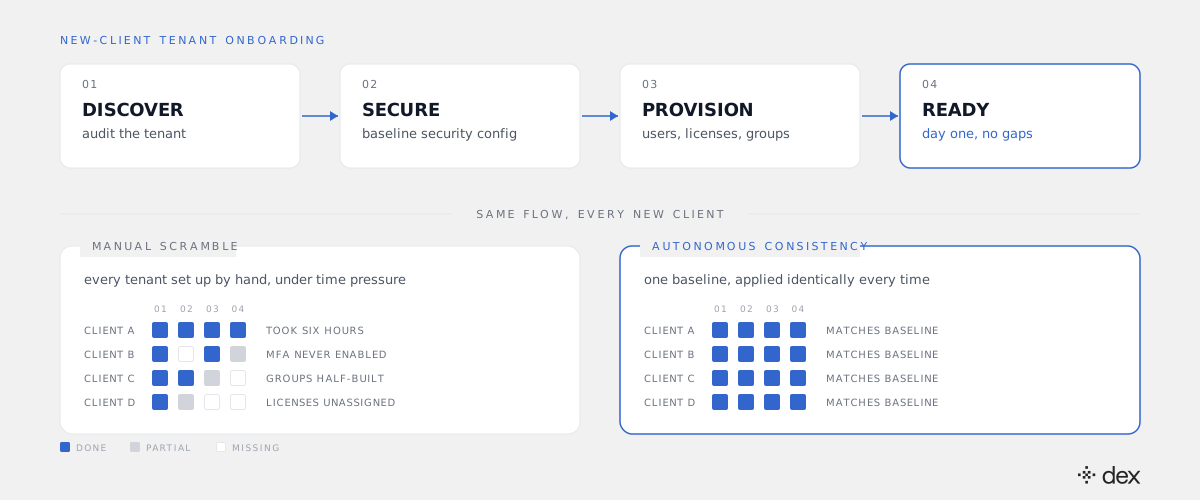
Agentic IT means software that investigates, plans, and executes IT work rather than routing or suggesting it. Applied to tenant onboarding, that maps onto four stages that run the same way for every client, in the same order, to the same depth. For the general definition, see what agentic IT is and how it differs from AI for IT.
Stage 1: discover
Dex Pro reads the tenant through delegated permissions, using the admin credential your client granted rather than a shared API key, and enumerates the full current state: accounts and their MFA status, admin role assignments, license allocation against license purchase, groups and their real membership, Conditional Access policies, external sharing posture, mailbox configuration, device enrollment. Then it compares that state against the baseline you defined and produces the gap list.
The important property here is that discovery does not get shorter when the go-live date gets closer. It runs to completion because it costs minutes rather than a technician's afternoon.
Stage 2: secure
The gap list drives configuration. Every action Dex takes has to match an explicit policy you authored: no policy, no action, enforced at the code level rather than as a prompt instruction. So "enforce MFA on all non-break-glass accounts" executes, and "remove this global admin" surfaces for approval if you scoped it that way. Dex Pro shows each action before executing, with an approve-always option for the bulk operations you have already decided about.
Dex never bypasses MFA and never grants itself admin roles. The security stage cannot quietly widen the tenant's blast radius, which is the thing that would otherwise make automating it a bad idea.
Stage 3: provision
Users, groups, and licenses. Correct SKU per role, group membership mapped to the client's actual departments, dynamic rules where they apply, shared mailbox permissions, distribution lists rebuilt rather than inherited. This is the stage MSPs already automate most often through scripts, and it is the stage where scripts break most often, because every client's org structure is slightly different from the one the script was written against. An engineer that investigates the specific tenant first does not have that failure mode.
Stage 4: ready
The final state gets verified against the baseline rather than assumed. Every action lands in both the Microsoft 365 audit log and Dex's own Activity Log, which means the handover document is a byproduct of the work instead of a separate task nobody has time for. You can hand the client a record of what their tenant looked like on day zero and exactly what changed.
Worth being precise about the scope: this is not a Tier 1 script runner. Dex resolves L1 through L3 autonomously, which covers the deeper Tier 2 and Tier 3 configuration and troubleshooting work that tenant onboarding is genuinely made of, not just the password-reset tier. Genuine architectural judgment calls escalate to your senior tech with full context attached.
Consistency is the deliverable, not speed
Speed is the headline and the wrong thing to optimize for. The compounding value is that client D's tenant matches client A's tenant.
When every tenant you manage was configured from the same baseline, three things become possible that were not before. You can answer "is this setting correct across all our clients?" without opening 40 admin centers. A new technician can work in any client tenant on their first week, because there is one environment shape to learn instead of 40. And when Microsoft changes a default or a CVE lands, remediation is one policy change applied everywhere, not a 40-tenant manual sweep. That last one is where the tenants-per-engineer math actually breaks in your favor.
Cliff DuPuy, Director of IT at Grand Traverse County, put the effect in revenue terms: "Dex helped us unlock $67K in value in a single day." Not efficiency savings. Work the team was finally able to deliver.
What it does to onboarding margin
Most MSPs either eat onboarding cost as customer acquisition or quote a fixed setup fee that assumes an average client and loses money on anything messier than average. Both are consequences of onboarding being unpredictable.
Make it predictable and the commercial options change. You can quote onboarding at a fixed fee you actually make margin on, because your cost per tenant stops depending on which technician drew the assignment. You can go live in days, which is a real differentiator in a competitive bid. And you can sell a tenant security audit as a standalone engagement to prospects who are not ready to switch providers, because stage one now costs you almost nothing to run. That is a paid first conversation instead of a free one. The broader version of this argument is in the agentic IT playbook for scaling MSP support without hiring.
One thing to be clear about: your PSA and documentation platforms stay exactly where they are. Dex works alongside them. They remain the system of record; Dex does the configuration work and writes back what it did.
Where to start on your next client
Do not begin with the whole flow. Begin with stage one on a tenant you already manage.
Point Dex Pro at an existing client, let it produce the gap list against your written baseline, and read what comes back. Two outcomes are both useful: either the tenant matches your standard, and you have just proven your baseline is real, or it does not, and you have found work worth doing on an account you thought was clean. Either way you now know what your baseline enforcement actually looks like in practice, which is the prerequisite for automating stage two with any confidence.
A note on compliance, since MSPs get asked: Dex is built by the team behind SysAid, whose platform is ISO 27001 certified and SOC 2 Type 2 compliant with annual third-party audits, and Dex is built on that foundation to the same standards. Dex's own SOC 2 Type 2 attestation is in process rather than held today. If a client's contract requires the certificate itself, say so plainly and route the question to us. The architecture details are on our security page.
If you want to see the four stages executed against a live tenant rather than described, join an upcoming Dex session for MSPs. It is real IT work, end to end.
The scramble was never about the difficulty of the work. It was about doing the same work from scratch, differently, every single time.
Frequently asked
- How long does it take an MSP to onboard a new client's Microsoft 365 tenant?
- Most MSPs budget one to two weeks of elapsed calendar time for a 50-to-200-seat tenant, of which 8 to 20 hours is actual engineer work. The gap between those two numbers is waiting: waiting for admin credentials, waiting for the client to confirm who should be in which group, waiting for a senior tech to free up long enough to review the security baseline. An autonomous IT engineer compresses the engineer-hours to a fraction and removes most of the queueing, because discovery and configuration run as soon as delegated access is granted rather than when a human has a free afternoon.
- What belongs in an MSP's Microsoft 365 security baseline?
- A defensible baseline covers at minimum: MFA enforced on every account including break-glass exceptions that are documented rather than silent, Conditional Access policies for legacy authentication and risky sign-ins, global admin count held to a named minimum with privileged accounts separated from daily-driver accounts, external sharing defaults in SharePoint and OneDrive set deliberately rather than left at tenant default, mailbox auditing on, and retention or litigation hold where the client's regulator requires it. The specific values are the MSP's call. The point of writing it down as a baseline is that it becomes checkable, and therefore repeatable across every client.
- Can an autonomous IT engineer configure a client tenant it has never seen before?
- Yes, because the first stage of the work is discovery rather than configuration. Dex Pro reads the current state of the tenant through delegated permissions, compares it against the baseline the MSP has defined, and produces the gap list. Configuration only happens against that gap list, and only where a policy explicitly permits the action. Nothing gets applied because it was assumed to be missing.
- How does an MSP keep client tenants isolated when one engineer covers all of them?
- Isolation has to be architectural, not procedural. Dex runs per-organization isolated databases with separate encryption keys, and acts through delegated permissions, meaning it operates as the credential it was granted in that specific tenant rather than through one shared API key with broad reach across all of them. Practically: work performed in one client's tenant cannot reach another, and every action lands in that client's own audit trail.
- Does this replace our PSA, RMM, or documentation platform?
- No. Your PSA is still where the contract, the ticket history, and the billing live, and your documentation platform is still the system of record for what a client's environment is supposed to look like. Dex works alongside them and does the configuration work itself, then writes what it did back out as an audit trail your documentation and your client's compliance review can both consume.