

The app-access backlog: keeping SaaS sprawl and permissions under control with autonomous IT
App access requests and permission reviews pile up in every Microsoft 365 tenant. How an autonomous IT engineer clears the backlog, with an audit trail.
Every new SaaS tool, every promotion, every project team, and every contractor onboarding adds a row to the same invisible queue: the app-access backlog. Access requests that take days to grant. Group memberships nobody can explain. Licenses assigned to people who left in March. The backlog is slow at the front end and never cleaned up at the back end, and both halves are security problems.
This post covers what an autonomous IT engineer actually does with that queue: how access requests, group and role changes, and periodic access reviews run end to end across Microsoft 365 and connected SaaS, what the audit trail looks like, and where a human still has to approve. If you are an IT security lead or an MSP carrying access work for dozens of tenants, the practical shift is this: the bottleneck stops being engineer hours and becomes the quality of your policy.
Why the permissions backlog never clears
Access work has a structural problem that ticket volume alone does not explain: granting is urgent and revoking is not.
When someone needs access to a SharePoint site to finish work today, there is a person asking, a manager escalating, and a deadline. When someone stops needing that access, nobody files anything. There is no requester, no deadline, and no complaint if it takes three years. So the grant side gets attention and the revoke side accumulates.
The result is a tenant where permissions only ever move in one direction. Three specific failure modes come out of that.
Orphaned access
Accounts and memberships that outlived their reason. The contractor's guest account still in the finance Teams channel. The group created for a 2024 migration that still confers write access to a live SharePoint library. Nobody is malicious; nobody is watching either.
Over-provisioning by convention
Requests get satisfied by copying someone else's access. "Give her what he has" is the fastest path to closing the ticket and the most reliable way to spread privilege that was never justified in the first place. Do it enough times and the average employee's permission set has no traceable origin.
Security drift
Each individual exception is defensible. The aggregate is not. Six months of reasonable one-off decisions produces a tenant that does not match any policy document you could show an auditor, which is exactly the gap a periodic access review is supposed to close and usually does not.
What "handled end to end" means for an access request
The distinction that matters when evaluating any tool in this space is between routing a request and resolving it. A system that turns a Teams message into a well-formatted ticket has moved the work, not done it.
Dex runs the sequence itself: it investigates the environment, plans the change, and executes it. For an access request, that looks like:
- Investigate. Who is asking, what do they already have, what does the resource they named actually require, and is there an existing group that confers it? Most access requests are ambiguous on first contact - users ask for "access to the sales folder," not for membership in a named security group.
- Check policy. Every action has to match an explicit, structured policy. No policy, no action. This is enforced in the execution layer at the code level, not as an instruction in a prompt, which is why prompt injection cannot talk its way past it.
- Branch or execute. Policy-bounded requests execute immediately in Entra ID, Exchange Online, SharePoint, Intune, or the connected SaaS app. Sensitive grants branch to a human owner first.
- Log. Who, what, when, why, and under which policy - written to Dex's Activity Log and reflected in the Microsoft 365 audit log.
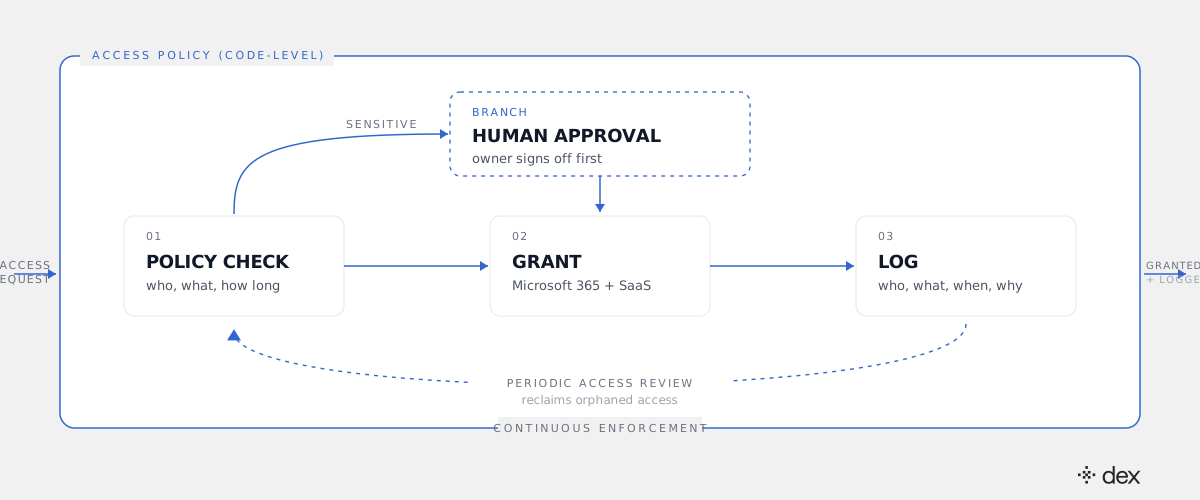
Two details in that pipeline do the security work. The first is delegated permissions: Dex Pro acts through the admin's own OAuth token, scoped to what that admin can already do, rather than a shared application-level API key with broad tenant access. The second is that the log is not a byproduct. As we argued in why the audit trail is the product, an autonomous system that cannot show its work is not deployable in a regulated environment, no matter how good its success rate is.
Group and role changes are the harder half
Individual grants are the visible part of access work. Group and role changes are where the real risk sits, because one change propagates to everyone downstream.
A role change on promotion is the standard example. Someone moves from support into finance. The correct handling is not additive: it requires removing the old team's memberships, adding the new ones, transferring or revoking shared mailbox and delegate rights, adjusting license assignments, and checking whether the combination creates a separation-of-duties conflict. Done by hand under time pressure, the removals are the step that gets skipped, and this is exactly how over-provisioning compounds.
Dex handles the whole set as one planned change rather than a list of tickets, and it reports the removals alongside the additions. This is also where the L1-through-L3 point matters in practice. Resetting a password is L1. Reconciling a role change across Entra ID groups, Exchange delegation, license SKUs, and two connected SaaS apps, then verifying nothing broke, is L2-L3 engineering work. Dex resolves both. Only genuine architectural and judgment calls escalate to a human, with the investigation attached.
The periodic access review, run as a standing job
The quarterly access review is a good control implemented badly almost everywhere. It arrives as a spreadsheet export, gets rubber-stamped by managers who cannot evaluate what they are approving, and produces a small number of revocations relative to the drift that accumulated.
The autonomous version is continuous rather than periodic. Dex enumerates group memberships, app role assignments, guest accounts, and licensed-but-inactive seats across Microsoft 365 and every connected SaaS app, compares that state against policy and actual usage, and splits the result into two piles: reclaims it is permitted to execute, and decisions that belong to a named owner. The first pile gets done and logged. The second gets routed to the person who can actually judge it, with usage evidence attached instead of a row in a CSV.
The side effect is a real number for license spend. Seats assigned and never used are a permissions problem and a budget problem in the same query.
Where a human still approves
Full autonomy on access grants would be the wrong design, and we do not ship it. Governed autonomy means the policy defines the boundary, and some things sit outside it by default:
- Privileged and admin roles. Dex never grants admin roles and never bypasses MFA. These are hard constraints, not defaults you can prompt your way around.
- Owner-designated sensitive resources. Finance systems, HR data, source repositories, production infrastructure - whatever your data owners have marked. The request branches to that owner before execution.
- Anything with no matching policy. The absence of a rule is a stop, not an invitation to improvise. This is the single most important property of the design.
- Bulk operations, until you trust them. Dex Pro shows every action before executing, with an "Approve Always" option for the classes of change you have decided are routine.
The honest framing of the trust question is the one we laid out in can you trust AI to run IT: you are not being asked to trust a model's judgment. You are being asked to write policy you would defend to an auditor, and then let it be enforced consistently, which is more than a manual queue delivers today.
What this changes for an MSP
Access work scales badly with tenant count. Each client has its own naming conventions, its own approval chain, its own SaaS stack, and its own idea of what counts as sensitive. An engineer who is fluent in one tenant is slow in the next, and the access backlog is the queue that quietly consumes the margin on a managed-services contract.
Per-tenant policy plus one engineer that executes against all of them changes the unit economics. Cliff DuPuy, Director of IT at Grand Traverse County, an MSP, described the effect on his team's output: "Dex helped us unlock $67K in value in a single day." That value was work the team got to do once the queue stopped owning their attention.
Dex also works alongside your ITSM rather than against it. SysAid, ServiceNow, Jira, and Halo remain the system of record for what still needs a human. What changes is how much reaches them: the access requests that were only ever waiting on someone with the right permissions and ten free minutes never become tickets at all.
Three things to check before you automate access
If you are considering this, the preparation is not technical. It is definitional.
- Name your sensitive resources. Not a category, a list. Which sites, groups, roles, and SaaS scopes require a human approval, and who is the named approver for each? If nobody can answer, that ambiguity is currently being resolved by whoever picks up the ticket.
- Ask any vendor how policy is enforced. In the prompt or in the code? A guardrail expressed as an instruction to a model is a suggestion. Ask to see where the block lives.
- Run a review before you automate. Get the current orphaned-access number first. It is the baseline you will measure against, and it is usually the argument that gets the project funded.
The app-access backlog is not evidence that your team is slow. It is evidence that granting and revoking permissions is unbounded, repetitive work that arrives faster than any queue can absorb. For a working walkthrough of the category and how it differs from copilots and chatbots, start with what agentic IT is, see the admin surface on the Dex Pro product page, or watch access requests and reviews run against a live Microsoft 365 tenant in our next Dex webinar.
Frequently asked
- How does an autonomous IT engineer handle an app access request?
- It runs the request end to end rather than routing it. Dex investigates who is asking, what they already have, and which group or role actually confers the access they need. It checks the request against an explicit access policy. If the policy allows it, Dex executes the change in Entra ID, the SaaS app, or both, using delegated permissions, then writes the who/what/when/why to its Activity Log and the Microsoft 365 audit log. If the policy does not cover the request, it stops and escalates with full context attached.
- Who approves sensitive access grants?
- A human does. Access policy in Dex is a code-level rule set, not a prompt instruction, and it can mark specific resources, roles, or SaaS scopes as approval-required. Those requests branch to the named owner (data owner, security lead, or the client's IT contact for an MSP) before anything is executed. Dex never grants admin roles and never bypasses MFA. Everything routine and policy-bounded runs without waiting on a human.
- How do periodic access reviews work with autonomous IT?
- Instead of a quarterly spreadsheet, the review runs as a standing job. Dex enumerates group memberships, app assignments, guest accounts, and licensed-but-unused seats across Microsoft 365 and connected SaaS, compares them against policy and actual usage, and produces a reclaim list. Removals that policy permits are executed and logged. Removals that touch sensitive systems go to the owner as a decision, not a report nobody reads.
- Can Dex manage access in SaaS apps outside Microsoft 365?
- Yes. Dex Pro connects to Google Workspace, Okta, Jira, ServiceNow, Salesforce, and SysAid out of the box, and can build a new integration mid-conversation against any SaaS platform with a REST API - it fetches the API docs, writes the integration, stores the credentials, and uses it immediately. That matters for access work specifically, because the long tail of unreviewed permissions usually lives in the tools that never made it onto the identity roadmap.
- Does automating access management increase security risk?
- It changes where the risk lives. A manual queue is not safe because a human is in it; it is slow, inconsistently reviewed, and rarely cleaned up. Automation moves the risk into the policy definition, which is inspectable and version-controlled. Dex enforces policy at the execution layer, uses the admin's own delegated OAuth token rather than a broad shared API key, and logs every action. The security question shifts from 'did someone check this?' to 'is our policy right?' - a question you can actually answer.