

The shadow IT you can't see: how autonomous IT closes the gap between what's approved and what's actually running
Unsanctioned apps, orphaned guests, and permission drift accumulate in every tenant. How autonomous IT finds shadow IT in Microsoft 365 and closes it.
Your Microsoft 365 tenant has two states. There is the approved state: the applications procurement signed off on, the external users somebody sponsored, the permissions that match a policy you could show an auditor. And there is the actual state, which is whatever is running in it right now. Those two were identical exactly once, on the day the tenant was built.
This post is about the gap between them. Where shadow IT in Microsoft 365 comes from, why the gap turned into a procurement problem this year rather than a hygiene problem, and what changes when an autonomous IT engineer reconciles approved against actual continuously instead of once a year in a spreadsheet. The short version: the gap is not a discipline failure on your team's part. It is the predictable output of a system where granting is easy, revoking is nobody's job, and nothing ever goes back to re-check.
What shadow IT actually looks like in a Microsoft 365 tenant
Shadow IT used to mean a server under someone's desk. In an M365-centric org it is quieter than that, and it lives inside the tenant you already pay for. Three forms account for almost all of it.
Unsanctioned apps holding live OAuth grants
Someone signs up for a meeting-notes tool, a PDF converter, a scheduling assistant. The consent screen asks for access to mail, files, or calendars, and they click Accept because they are trying to finish something. Unless your user consent setting in Entra ID requires admin approval, that grant is now live, it does not expire, and it survives the user losing interest in the tool three weeks later. The vendor's security posture is now part of yours, and nobody in IT has ever heard the product name.
Orphaned guest accounts
A SharePoint share or a Teams add creates an external identity in your directory. The project it was created for ends. The contract lapses. The person changes jobs. None of those events touch your tenant, so the guest keeps its group memberships and site access indefinitely. Guests are the single most reliable source of drift in a collaborative org, because creating one is a two-click action available to ordinary users, and removing one is an administrative action nobody is assigned.
Permission drift
Every individual exception is defensible. A nested group added during a migration. Inheritance broken on one SharePoint library so a vendor could see a single folder. A standing role assignment granted for an incident in 2024 and never rolled back. Six months of reasonable decisions later, the effective permissions in your tenant do not match any document you could produce on request, and no single person made a bad call anywhere in that chain.
Why the gap stopped being a hygiene problem
Two years ago, this was a tidiness issue you fixed when you had a slow week. It is now a diligence question, and the pressure arrived from an unexpected direction.
Enterprise procurement teams spent the last year building a screening process for AI vendors: how is the model governed, what data does it touch, who approved the deployment, and where is the audit trail. The ISO/IEC 42001 AI management standard gave that process a vocabulary, and the questionnaires got specific fast. Anyone who has filled one out recently knows the format.
The same rigor is now being turned inward. If your organization is asking vendors to evidence what their systems do, your own auditors, insurers, and board are asking you the equivalent question about your tenant: prove what is actually running in it. Which third-party applications hold access to corporate mail today? Which external identities can reach the finance site? Can you show that the answer you gave last quarter is still true?
That is a reasonable question, and shadow IT is the reason most IT leaders cannot answer it. The approved state is documented. The actual state has never been measured.
Approved state, actual state, and the delta between them
Here is the shape of the problem on a mid-sized tenant.
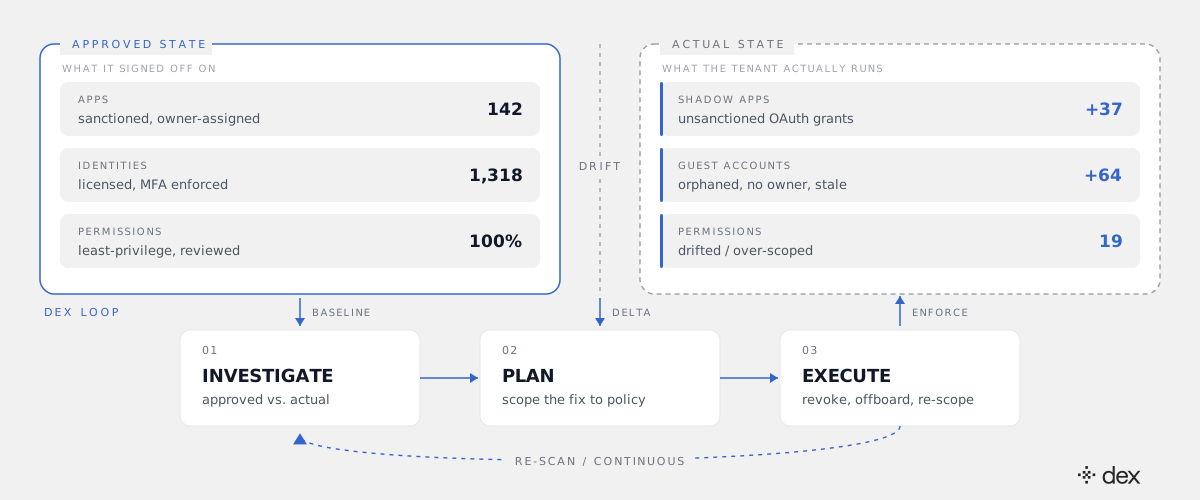
The left side is what IT signed off on: 142 sanctioned applications, each with an owner, and 1,318 licensed identities that all pass the policy you wrote. The right side is what the tenant is actually running: 37 additional applications holding live OAuth grants nobody approved, 64 guest accounts with no current sponsor, and 19 permission sets that no longer match the rule they were granted under.
Nothing on the right side is an incident. That is precisely what makes it dangerous. There is no alert, no complaint, no ticket, and no deadline, which is why the delta grows monotonically until an audit, an insurance renewal, or a breach forces someone to go look.
The reconciliation loop: investigate, plan, execute
The reason this work does not get done is not that the queries are hard. It is that discovery produces a list, and the list produces hundreds of individual judgment calls that nobody has budget to make. A report is not a control.
Dex runs the whole loop rather than the first step of it, which is the same investigate, plan, execute sequence it applies to any other request:
- Baseline. Enumerate the actual state. Enterprise applications and their consent grants, guest accounts and their sponsors, group memberships, standing role assignments, and site-level permissions across Entra ID, Exchange Online, SharePoint, Teams, and Intune, plus any connected SaaS.
- Delta. Compare that against the approved state and against real usage. An app that holds Mail.Read and has not been signed into in 90 days is a different item from an app that half of finance uses daily. Usage is what separates a cleanup candidate from a conversation with a business owner.
- Enforce. Execute what policy permits: revoke dormant OAuth grants, offboard unsponsored guests, re-scope permissions back to the group that should confer them. Route the rest to a named owner with the evidence attached, rather than as a row in a CSV.
- Re-scan. Continuously, because the tenant kept changing while step three was running. This is the part that makes it a control instead of a project.
Two details do the actual security work here. Dex Pro acts through the admin's own delegated OAuth token, scoped to what that admin can already do, rather than a broad application-level API key. And every action lands in both Dex's Activity Log and the Microsoft 365 audit log, with the policy it matched recorded alongside it. That is what turns the cleanup into something you can hand to an auditor. The details of the permission model, the policy engine, and where Dex's certifications actually stand are laid out on our security and compliance page.
This is also where the L1-through-L3 range matters in practice. Revoking a stale consent grant is routine. Reconciling a drifted permission set across nested Entra groups, broken SharePoint inheritance, and two connected SaaS apps, then verifying nothing downstream broke, is Tier 2 and Tier 3 engineering work in most orgs. Dex resolves both. Genuine architectural and judgment calls escalate to a human with the full investigation attached.
The backlog you can see, and the state you can't
These are two different problems and they need saying separately.
The visible one is the queue: access requests waiting on someone with the right permissions and ten free minutes. We covered how an autonomous engineer clears that in the app-access backlog post, including where approvals stay human and how periodic access reviews run as a standing job instead of a quarterly spreadsheet.
The invisible one is this post's subject: the state nobody requested and nobody is tracking. No ticket was ever filed for the 37 unsanctioned apps, because from the user's perspective nothing is wrong. Clearing your backlog perfectly does not touch that delta at all. You can have a clean queue and an unprovable tenant at the same time, and most organizations do.
Where a human still decides
Full autonomy on revocation would be the wrong design, and it is not what ships. Governed autonomy means the policy draws the boundary, and some things sit outside it deliberately:
- Anything with no matching policy. The absence of a rule is a stop, not an invitation to improvise. This is the single most important property of the design.
- Business-critical integrations. An unsanctioned app that forty people depend on is a procurement conversation, not a revocation. The delta surfaces it with usage evidence; a human decides.
- Privileged roles and break-glass accounts. Dex never grants admin roles and never bypasses MFA, and standing privileged assignments are flagged for review rather than removed unilaterally.
- Bulk operations, until you trust them. The Dex Pro console shows the full change set before it runs, with an "Approve Always" option for the classes of change you have already decided are routine.
What to do this quarter
Three steps, in order, and only the last one involves buying anything.
- Measure the delta once. Pull consent grants, guest accounts, and standing role assignments, and compare them against what you believe is approved. The number you get is your baseline and it is usually the argument that funds the project.
- Fix the inflow before the backlog. If users can self-consent to third-party apps, the delta regenerates. Decide the consent policy first, then clean up, or you will do the cleanup twice.
- Make reconciliation continuous, not annual. The state drifts daily. A control that runs once a year gives you a defensible answer on one day and an unknown tenant for the other 364.
If you want to see a baseline-and-delta pass run against a live Microsoft 365 tenant, join the next Dex webinar, or start with Dex and point it at your own.
Shadow IT is not evidence that your users are careless or your team is sloppy. It is what accumulates when every system in the tenant is built to grant access and none of them are built to ask, six months later, whether that access is still supposed to exist.
Frequently asked
- What is shadow IT in Microsoft 365?
- Shadow IT in Microsoft 365 is everything running in your tenant that nobody approved, sponsored, or scoped. In an M365 context it is rarely a rogue server under someone's desk. It is three quieter things: third-party applications holding live OAuth grants to mail, files, or calendars because a user clicked Accept; guest accounts created by a SharePoint or Teams share that outlived the project that justified them; and permissions that drifted away from the policy they were granted under through nested groups, broken SharePoint inheritance, and standing role assignments. All three are invisible by default, because nothing in the tenant is designed to notice that a grant stopped being necessary.
- How do I find unsanctioned apps in my Microsoft 365 tenant?
- Start with enterprise applications and app registrations in Entra ID, and read the consent records rather than the app list: you want to know which apps hold delegated or application permissions, which scopes they hold, who consented, when, and whether the app has been used since. Cross-reference against sign-in logs to separate live integrations from dormant grants. Then check your user consent setting, because if users can consent to third-party apps on their own, the list you just built will be different next month. Finding them once is a report. Finding them continuously is the control.
- Why are orphaned guest accounts a security risk?
- A guest account is an external identity with standing access to whatever it was added to, and it is governed by the other organization's security posture, not yours. When the project ends, the vendor contract lapses, or the person leaves that company, nothing in your tenant changes. The account keeps its group memberships and site access indefinitely. The risk is not that a guest does something malicious; it is that an identity you no longer have any relationship with is still an authenticated path into your data, and it will not appear in any offboarding process you run.
- Is this the same thing as a Defender for Cloud Apps or CASB report?
- No, and the difference is what happens after discovery. Discovery tooling is good at producing the list: here are the apps, the risk scores, the guests, the over-scoped permissions. What it does not do is close the loop, so the list becomes a quarterly artifact that somebody has to turn into hundreds of individual changes by hand, which is the step that never gets staffed. An autonomous IT engineer treats the delta as work rather than as a report. It investigates each item, checks it against policy, executes the revocations and removals that policy permits, and routes the rest to a named owner with evidence attached.
- Can an autonomous system revoke access without breaking something?
- Only if revocation is policy-bounded and reversible, which is how it is designed in Dex. Every action must match an explicit, structured policy, and no policy means no action, enforced at the code level rather than as an instruction in a prompt. For cleanup work that means named exclusions for service accounts and break-glass identities, a grace window before anything dormant is touched, a change set the admin reviews before it runs, and one-click rollback. Every change is written to Dex's Activity Log and reflected in the Microsoft 365 audit log, so the cleanup itself is auditable.